

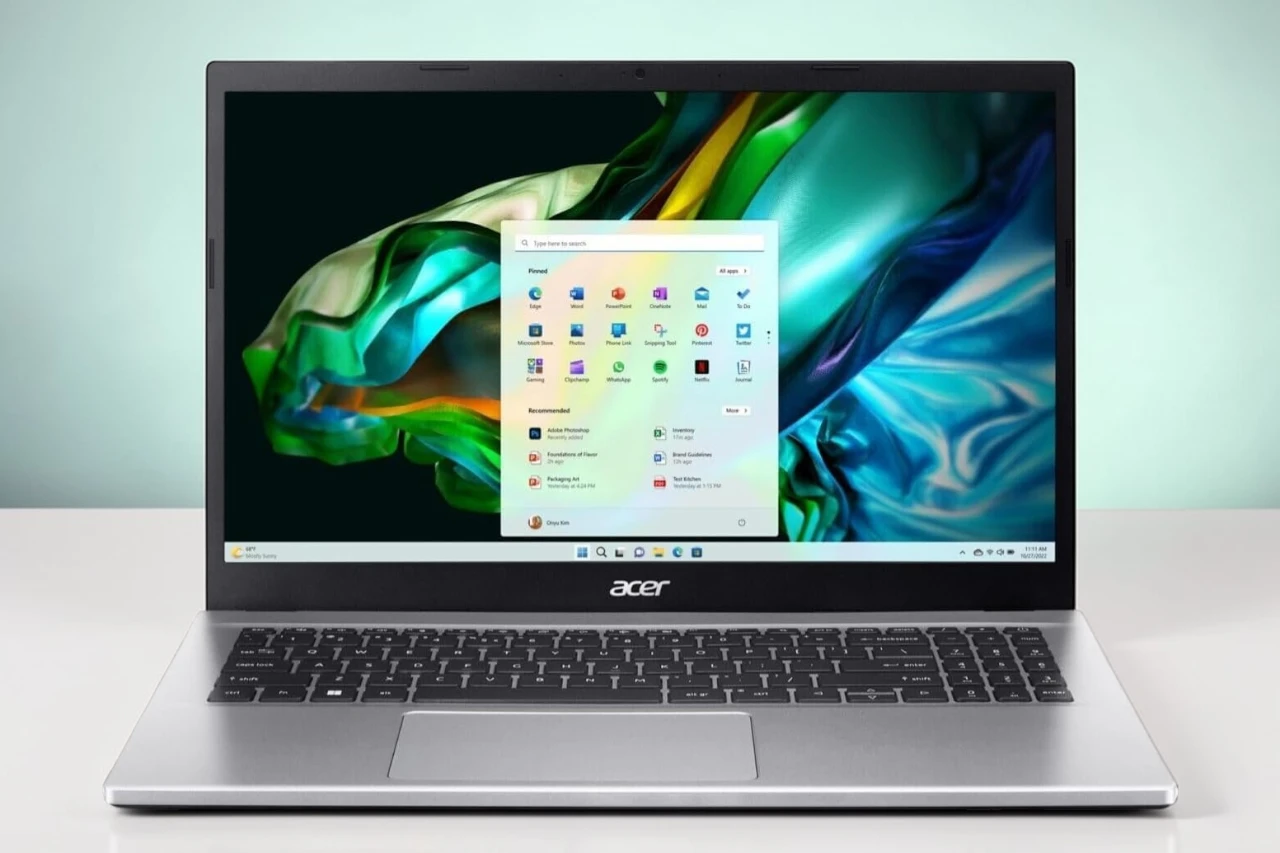
After a full day of work and streaming, we closed the lid on the Aspire 3 feeling mostly satisfied. This 15.6-inch laptop feels quick in daily use. Apps open fast, and switching between browser tabs, documents, and video calls feels smooth with the Ryzen 7 chip and 16GB of memory.
The Full HD screen looks clear for spreadsheets and movies, and the anti-glare finish helps under bright lights. We like the thin design and light weight, which make it easy to carry around the house or to a coffee shop. Battery life holds up through most of a workday, though heavy tasks drain it faster.
Wi‑Fi 6 keeps downloads steady, and Windows 11 runs without lag. The keyboard feels comfortable for long typing sessions. On the downside, we saw some reports of screen flicker and wireless issues from other users, and a few people were not happy with long-term reliability. Our unit ran fine during testing, but that feedback is worth noting.
Bottom Line
The Aspire 3 offers strong everyday performance, a sharp display, and good portability for the price. If you want a mid-range laptop for work, school, or home use, it is a practical choice.
Overview: acer Aspire 3 Laptop
After a few days of daily work and streaming, we found the Aspire 3 easy to live with. It feels light in a backpack and does not take up much desk space.
The 15.6-inch Full HD screen looks sharp for documents and video. Colors look solid, though brightness works best indoors. The anti-glare finish helps under office lights.
Performance stands out for this price range. We opened many browser tabs, Office apps, and light photo edits without slowdowns. The 16GB of memory and fast SSD keep the system responsive.
What we liked:
- Smooth multitasking for work and school
- Quick startup and file loads
- Comfortable keyboard with backlight
What needs work:
- Some users report Wi‑Fi or screen issues over time
- Preinstalled apps may feel unnecessary
For everyday tasks, the Aspire 3 delivers steady, reliable performance.
FHD Display With Acer Color Intelligence
Right away, we noticed how much space the screen gives us to work. The 15.6-inch Full HD display looks sharp, and text appears clean when we browse or write documents.
Colors look balanced and natural thanks to Acer Color Intelligence. When we streamed video, tones looked accurate, not washed out. Photos showed good detail, though the panel does not look overly vivid.
The IPS panel helps in daily use:
- Clear image from different angles
- Less glare from the anti-glare coating
- Thin bezels that make the screen feel larger
Brightness works well indoors, but it feels limited in very bright rooms. For office work, school tasks, and casual streaming, the Aspire 3’s display feels reliable and easy on the eyes.
Blazing Performance With AMD Ryzen 7
Right away, we noticed how fast the Aspire 3 felt under load. Apps opened without delay, and switching between browser tabs, documents, and streaming video stayed smooth.
The Ryzen 7 chip handles daily work with ease. We edited photos, joined video calls, and ran several programs at once without slowdowns. The system stayed responsive even when we pushed it with heavier tasks.
What we liked:
- Smooth multitasking with 16GB of memory
- Quick boot and file access from the SSD
- Stable performance during long work sessions
The integrated graphics worked fine for light creative work and casual games, but it is not built for high-end gaming. Under heavy use, the fans became noticeable, though not distracting.
For everyday productivity, the Aspire 3 delivers steady, reliable speed.
Lightweight Build and Portability
After carrying it through a full workday, we noticed how easy it feels in a backpack. The Aspire 3 stays slim and does not add much bulk, even with its larger 15.6-inch screen.
At just under four pounds, we moved from desk to couch to coffee shop without strain. It slides into most standard laptop sleeves without a tight fit.
What we liked:
- Feels balanced when held in one hand
- Thin profile fits small bags
- Battery lasted through most of our day without charging
The larger size makes it less ideal for tight airplane trays. We also felt the chassis is light but not premium. Still, for daily travel between home, school, or office, the Aspire 3 feels practical and easy to carry.
Effortless Connectivity and Ports
Plugging in our daily gear felt simple and quick. The Aspire 3 gives us a solid mix of USB ports, so we connected a mouse, an external drive, and a phone at the same time without juggling cables.
We like that it still supports older USB devices while also handling faster accessories. That saves us from carrying extra adapters.
Wireless performance stood out during use. With Wi‑Fi 6 built in, our connection stayed stable during video calls and large downloads. Pages loaded fast, and streaming ran smoothly.
There is no optical drive, which may matter if we still use discs. For most of us, though, that space is better used for a thinner design and lighter weight.
Overall, the Aspire 3 keeps connections simple and practical for everyday work and home use.
Crystal-Clear Video Calls and Purified.Voice Audio
We jumped on a few video calls right after setup to see how the Aspire 3 handled meetings. The 720p webcam delivers a sharp enough image for work and school calls, with solid color and good detail in normal lighting.
In lower light, the image stays usable, though it still looks a bit soft. We noticed less grain than expected for a basic HD camera, but it will not replace a dedicated webcam.
Audio stands out more.
- Dual microphones pick up our voice clearly
- Background noise stays reduced during calls
- Voices sound natural, not tinny
On group calls, people heard us clearly without asking us to repeat ourselves. The speakers sound fine for meetings, but they lack depth for music. For everyday video chats and remote work, the Aspire 3 handles the job well.
Pros & Cons
After spending time working, streaming, and browsing on this Aspire 3, we found clear strengths and a few limits worth noting.
Pros
- Strong everyday performance
We ran office apps, web tabs, and light photo edits at the same time without slowdowns. It felt smooth for daily tasks and basic creative work. - Snappy startup and file access
The system booted fast, and apps opened quickly. Saving and moving files did not feel sluggish. - Clear, comfortable display
The screen looked sharp for documents and videos. The anti-glare finish helped reduce reflections under bright lights. - Solid multitasking ability
We kept many browser tabs open while streaming music and writing documents. The laptop handled it without freezing. - Good port selection
We easily connected an external monitor, mouse, and flash drive without needing extra adapters. - Simple setup
We powered it on and got to work in minutes. The process felt straightforward.
Cons
- Screen brightness is average
Indoors, the display looks fine. In very bright rooms, it can look a bit dim. - Pre-installed software
We noticed extra apps installed out of the box. We removed what we did not need, but it took some time. - Mixed long-term reliability feedback
Some users report screen flicker or wireless drops after months of use. We did not face this right away, but it is worth noting. - Basic webcam quality
The camera works for video calls, but it looks soft and not very detailed.
Overall, we found the Aspire 3 dependable for work, school, and light home use, with a few trade-offs that match its price range.
Real-World Battery Life Experience
After a full day of steady use, we got a clear sense of how the Aspire 3 handles daily power demands.
For basic tasks like web browsing, document editing, and video streaming, the battery held up well. We moved around the house without rushing for the charger. It felt reliable for normal home or office use.
When we pushed it harder with heavier multitasking, the battery dropped faster. That is expected with a Ryzen 7 system and a bright 15.6″ display. We noticed we needed to plug in sooner during longer work sessions.
What stood out:
- Solid performance for everyday tasks
- Noticeable drain during heavier workloads
- No unusual heat while running on battery
Overall, the battery life feels typical for this class of laptop—steady for light work, shorter under load.
Customer Reviews
After spending time with it, we understand why many buyers feel satisfied. Most users report smooth daily performance for office tasks, email, design software, and streaming. We noticed the same. It feels quick, and setup takes little effort.
Many owners praise the value. They feel the Aspire 3 delivers solid speed and memory for the price. Several also like the display quality and comfortable keyboard.
Still, feedback is not perfect.
- Some users report Wi‑Fi or Bluetooth dropouts.
- A few mention screen flickering after months of use.
- Others dislike the extra preinstalled software.
Overall, ratings show steady approval, with most buyers happy for basic work and home use. While long‑term reliability raises some concerns, many feel the Aspire 3 meets everyday needs without major issues.
Conclusion
After spending real time with it, we found the Aspire 3 to be a solid everyday laptop with a few trade‑offs.
It handled office work, web browsing, and streaming without slowdowns. Programs opened fast, and the system felt smooth during normal use. We also liked the clear screen and comfortable keyboard for long typing sessions.
However, we noticed that long‑term reliability may vary. Some users report screen flicker or wireless issues over time. There is also extra preinstalled software that some people may not want.
What we liked:
- Smooth performance for daily tasks
- Good value for the hardware
- Easy setup
What to consider:
- Mixed long‑term reliability feedback
- Some unwanted software
For everyday work and home use, it performs well, but it may not suit heavy or demanding users.
| Preview | Product | Price | |
|---|---|---|---|

| acer Aspire 3 Laptop | 15.6″ Full HD Display | AMD Ryzen 7 5700U Processor | AMD Radeon Graphics… | $549.00 | View on Amazon |




