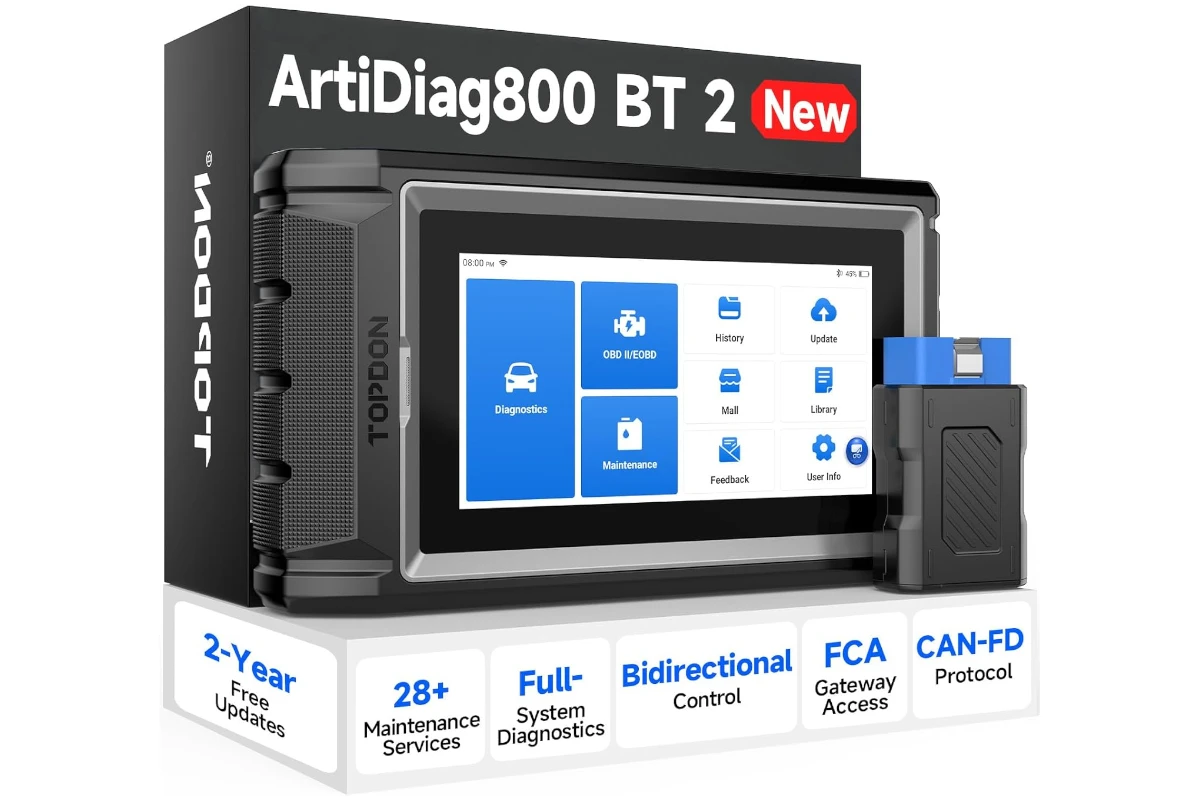
TOPDON ArtiDiag 800 BT 2 Review: Who It’s Best For (and Who Should Skip)
A shop-like, bidirectional scan tool for serious DIYers—excellent capability for the money, with a slightly annoying setup process.
- Best for: DIYers who want full-system diagnostics + real service resets.
- Highlights: bidirectional active tests, wireless VCI, 28+ maintenance functions.
- Trade-offs: registration/pairing can be frustrating; not a deep ECU programming tool.
If you’re shopping for an OBD2 scanner, you’ve probably noticed the market splits into two extremes: cheap Bluetooth dongles that mostly read/clear engine codes, and professional scan tools that cost “shop money.” The TOPDON ArtiDiag 800 BT 2 (often listed as AD800BT V2.0) sits right in the middle—priced like a serious DIY upgrade, but marketed with features people usually associate with higher-end tools.
I reviewed it because I wanted a scanner that could do more than just shut off a check-engine light. Specifically, I wanted full-system diagnostics, real service resets, and (ideally) bidirectional/active tests—without paying premium-brand pricing. I also wanted something that feels like a tool you can actually keep for years, not a plastic gadget you regret after two uses.
At around $379.99 in the configuration I’m reviewing, it’s definitely more expensive than entry-level OBD readers. But it’s also far cheaper than the “big name” shop scanners. The big question is whether it earns that midrange price by delivering real-world capability—and not just a long marketing checklist.
Quick Verdict
Verdict: The TOPDON ArtiDiag 800 BT 2 is best for serious DIYers and small shops who want bidirectional tests and 28+ service functions at a midrange price—but it’s not ideal if you hate device registration, want top-tier coding/programming, or only need basic engine codes.
Best for:
- DIY owners who maintain multiple vehicles and want service resets + full-system scans
- People upgrading from basic OBD2 readers who need more than engine code reads
- Small garages that want strong coverage and wireless convenience without pro-scan-tool pricing
Not ideal for:
- Anyone who gets frustrated by account setup/registration steps
- Buyers who only need basic “read/clear codes” (cheaper tools are enough)
- Advanced users expecting deep ECU programming/coding like flagship professional systems
Biggest real-world benefit: it feels like an “auto shop” style scanner in daily use—full systems, service functions, active tests—without the wallet shock.
Main trade-off: the onboarding (registration + initial pairing) can be the most annoying part of ownership, and it’s still not a replacement for top-tier programming tools.
At a Glance
- Category: Midrange bidirectional OBD2 diagnostic tablet + Bluetooth VCI dongle
- Price range: Midrange (reviewed around $379.99)
- Key feature: Bidirectional (active test) capability + 28+ service functions
- Best use case: Serious DIY diagnostics and maintenance resets across multiple vehicles
- Standout convenience: Wireless VCI + tablet-style interface with a large, easy-to-read screen
- Updates: 2 years of free updates included (then consider ongoing costs depending on your needs)
Test conditions:
- Usage scenario: home garage / driveway diagnostics and maintenance troubleshooting
- Duration tested: long enough to go from first setup frustrations to regular “grab it when needed” use
- Goal: confirm real-world usability—scanning speed, interface clarity, connection reliability, and whether the “extra” features actually save time
What Is the TOPDON ArtiDiag 800 BT 2?
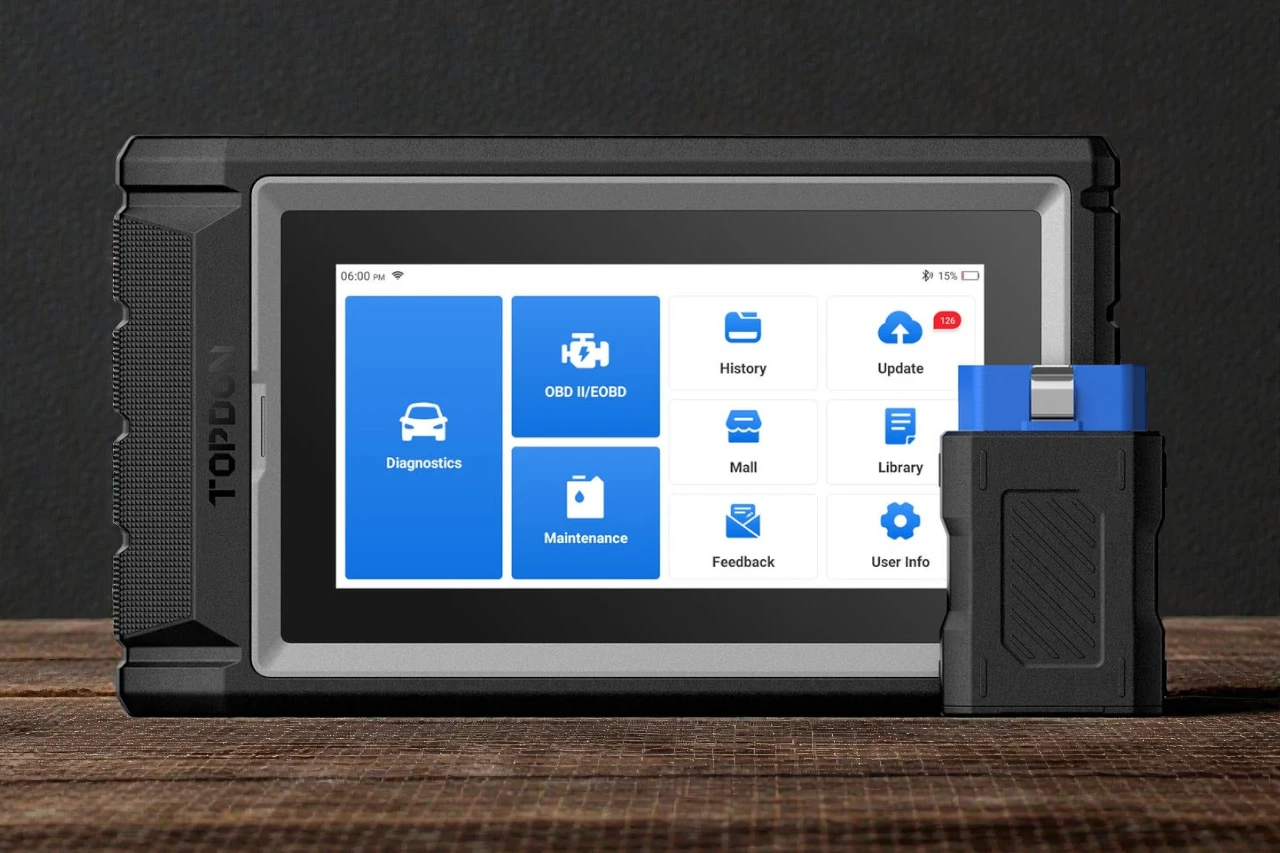
This is a tablet-style automotive diagnostic scanner with a Bluetooth VCI (vehicle communication interface) dongle. Instead of plugging a corded handheld reader directly into the OBD port and squinting at a tiny screen, you plug in the VCI dongle and run diagnostics from the tablet.
TOPDON positions the ArtiDiag800BT V2.0 as a higher-capability step above basic readers: full-system diagnostics (not just engine), bidirectional active tests, and a long list of maintenance/service functions (oil reset, EPB, SAS, injector coding, ABS bleeding, DPF regen, and more).
In plain English: it’s meant to help you diagnose the problem, not just acknowledge the warning light.
Real-World Performance
Day-to-day diagnostics: where it feels “shop-like”
Once I got it set up properly, it became the kind of tool you actually reach for when something feels off. The biggest difference versus cheap OBD readers is how quickly you can move from “What code is stored?” to “What system is complaining, what’s the live data doing, and what’s the likely next step?”
Full-system scanning is a big deal in real life because many issues aren’t isolated to the engine computer. If you’ve ever dealt with ABS lights, airbag warnings, EPB quirks, steering-angle sensor issues, or modern battery-management behavior, you already know the frustration of tools that simply can’t see those modules.
This scanner’s workflow is closer to what you’d expect in a shop: identify the vehicle, scan modules, read codes, look at freeze frame/live data, then clear and verify.
Live data: more useful than you’d think
Live data is one of those features that sounds nerdy until you need it. When your car runs “kind of weird,” live data helps you separate a guess from a diagnosis. I like that you can view data in readable formats and compare/graph streams, because it prevents the “scroll through endless sensor lines and hope you notice something” problem.
It’s not about being a data scientist. It’s about being confident that you’re fixing the right thing.
Bidirectional/active tests: powerful when you use it correctly
Bidirectional control is one of the main reasons people step up to this class of tool. Instead of only reading what the car is reporting, you can command certain components and see what happens—helpful for narrowing down whether the problem is the part, wiring, or control logic.
In practice, active tests are where you can save serious time—but only if you use them carefully and you understand what you’re commanding. For a serious DIYer, that means you can confirm functionality instead of blindly swapping parts. For a small shop, it means faster troubleshooting and fewer wasted labor hours.
The built-in “help me fix it” angle
One feature I genuinely enjoyed is the “search how to fix an issue” style guidance built into the tablet workflow. When you’re troubleshooting, the worst feeling is getting a code and then bouncing between five forums and three videos trying to figure out what matters.
This doesn’t magically replace experience, but it does reduce friction. When you’re in the middle of diagnosing a car, having the tool itself help you move from code → likely cause → next step is surprisingly useful.
Speed and responsiveness
Overall speed felt appropriate for a midrange scanner. It’s not a $2,000+ flagship device, so I don’t expect instant everything. But once connected and running, it did what I needed it to do without feeling sluggish or fragile.
The one caveat: like many Android-based diagnostic tablets, performance can be influenced by how bloated the software gets over time and how many updates/features accumulate. I’d keep it focused on “scan tool duties,” update it responsibly, and avoid treating it like a general-purpose Android tablet.
Build Quality & Durability
This is one of the areas where I think TOPDON did a good job. The device feels well-built, with a rugged outer casing that makes sense for a garage environment. It doesn’t feel like something you have to baby.
The VCI dongle also feels solid. In real life, that matters—because these dongles get bumped, dropped, and occasionally yanked out by accident when someone forgets it’s plugged in.
If you’re buying this type of tool, durability is part of the value. A scanner you’re afraid to use isn’t worth much.
Ease of Use & Setup
The honest truth: setup can be the worst part
My roughest experience was at the beginning: getting the VCI to connect and getting everything registered correctly. Once I figured it out, it was smooth—but that first phase felt more annoying than it needed to be.
This matches the pattern I’ve seen with many “serious” diagnostic tools: the capability is there, but onboarding sometimes feels like a tech product rather than a mechanic’s tool.
If you’re the type who hates account creation, email verification, pairing steps, and “please update first,” just know that this can be the speed bump before you get to the good part.
After setup: daily usability is strong
Once everything is paired and updated, day-to-day operation is straightforward. The screen size helps a lot—menus are readable, you’re not fighting tiny text, and it’s easier to hand the tablet to someone else and say, “Look at this code list.”
Wireless is also a practical win. You can be in the driver seat looking at live data while someone else checks something under the hood, and you don’t feel tethered.
Small annoyances to know
A few “quality of life” notes that matter in real use:
- Expect occasional learning curve moments as you navigate module lists and tool terminology.
- AutoVIN is convenient when it works, but you should still be comfortable entering vehicle details manually when needed.
- Because it’s a tablet-style tool, you’ll want to keep it charged and stored in a consistent place so it’s ready when you need it.
Who This Product Is For
This is the right tool for a specific kind of buyer:
- Serious DIY enthusiasts who do their own brakes, fluid services, sensor replacements, and troubleshooting—and are tired of guessing.
- Households with multiple vehicles where a higher-end scanner becomes cost-effective over time.
- Small repair businesses that want strong feature coverage and bidirectional testing without the cost of premium-brand platforms.
- Anyone upgrading from a basic OBD reader because they’ve hit the ceiling: “I can read the code, but I can’t do anything meaningful with it.”
If that’s you, this tool can feel like a major step forward.
Who Should Skip This Product
You should skip the ArtiDiag 800 BT 2 if:
- You only want a cheap tool to read/clear engine codes a few times a year.
- You want deep ECU programming/coding capabilities that are usually associated with higher-tier professional tools.
- You don’t want to deal with registration/account setup or initial connectivity friction.
- Your expectations are “Snap-on-level everything,” but you’re shopping in the midrange price tier.
In those cases, either go cheaper (basic OBD reader) or go higher-end (professional ecosystem tool) depending on what you truly need.
Pros & Cons
Pros:
- Excellent value for capability: it delivers a “shop tool” feel at a fraction of premium-brand pricing
- Bidirectional/active tests: real troubleshooting power when you use it correctly
- Full-system diagnostics: not limited to engine—more useful for modern vehicles
- 28+ service functions: strong maintenance/reset coverage for serious DIY work
- Wireless convenience: the Bluetooth VCI makes real-world use easier than corded tools
Cons:
- Registration/setup can be frustrating: the worst part is getting started
- Midrange price is still midrange: far above basic OBD readers, so casual users may not benefit
- Not a top-tier programming tool: great diagnostics and service functions, but don’t expect flagship-level coding depth
- AutoVIN isn’t guaranteed: convenient when it works, but you’ll sometimes fall back to manual entry
Upgrade to Shop-Level Diagnostics at Home
Get bidirectional active tests, full-system scans, and 28+ service resets—without paying premium tool prices.
Comparison to Alternatives
Versus cheap Bluetooth OBD dongles (ELM327-style)
If you only want engine codes and a basic app, a cheap dongle is the budget play. But the moment you need ABS/airbag modules, service resets, or bidirectional tests, those tools start feeling like toys.
The TOPDON is the “I’m done wasting time” upgrade.
Versus premium shop brands (Snap-on-class tools)
The reason people name-drop premium brands is simple: they’re excellent. But they’re priced for professional workflows and business ROI.
What impressed me here is that for the average DIYer (and even small businesses), this TOPDON gets you a lot of the practical functionality you actually use—at a price that’s easier to justify.
Versus other midrange tablets (Autel/LAUNCH-style competitors)
This is where the real decision is. In the midrange tablet class, the differences often come down to:
- which software workflow you prefer,
- update policy/value over time,
- vehicle coverage for the brands you care about,
- and how reliable the wireless experience feels.
The ArtiDiag 800 BT 2 holds its ground with strong features, solid build quality, and a practical user experience once it’s set up. If you value “capability per dollar,” it belongs on your shortlist.
FAQ
Is the TOPDON ArtiDiag 800 BT 2 good for DIY mechanics?
Yes—this is exactly the kind of tool that makes DIY work more accurate and less frustrating.
Will it work on all cars?
It’s designed for broad coverage across many models, but no scan tool is truly universal. If you own less common vehicles, confirm compatibility before buying.
Does it do bidirectional tests on every vehicle?
Bidirectional support can vary by vehicle/system. The feature is a major advantage, but don’t assume every active test works on every car.
Can it reset common warning lights and maintenance reminders?
That’s one of its main strengths—especially compared to basic OBD readers that can’t perform many service resets.
Do I have to pay for updates later?
This model includes 2 years of free updates. After that, your decision depends on whether you need newer coverage/features or are satisfied with what you already have.
Is it worth it if I only want to clear a check engine light?
No. If that’s your only goal, a much cheaper tool will do the job.
Final Verdict – Should You Buy It?
Score: 8.6 / 10
If you’re a serious DIYer or a small shop trying to get “real diagnostic power” without paying premium-brand money, the TOPDON ArtiDiag 800 BT 2 makes a strong case. Once it’s up and running, it feels like a proper workshop tool: full-system scanning, useful service functions, bidirectional capability, and a screen that makes diagnostics less miserable.
The main compromise is the onboarding friction—registration and initial VCI connection can be irritating—and the fact that midrange tools still aren’t the same as top-tier programming platforms.
Best-fit users: serious DIY owners, multi-vehicle households, and small businesses that want high capability per dollar.
Who should skip: casual users who only need basic code reading, and advanced pros who require deep ECU programming.
Value summary: at this price, the capability you get is genuinely impressive—especially if you’ll use service functions and active tests more than a few times a year.
| Preview | Product | Price | |
|---|---|---|---|

|
TOPDON Scanner AD800BT V2.0, Bidirectional Scan Tool, Full Systems Diagnostic Tool for All Vehicles… | $389.99 $329.99 | View on Amazon |