

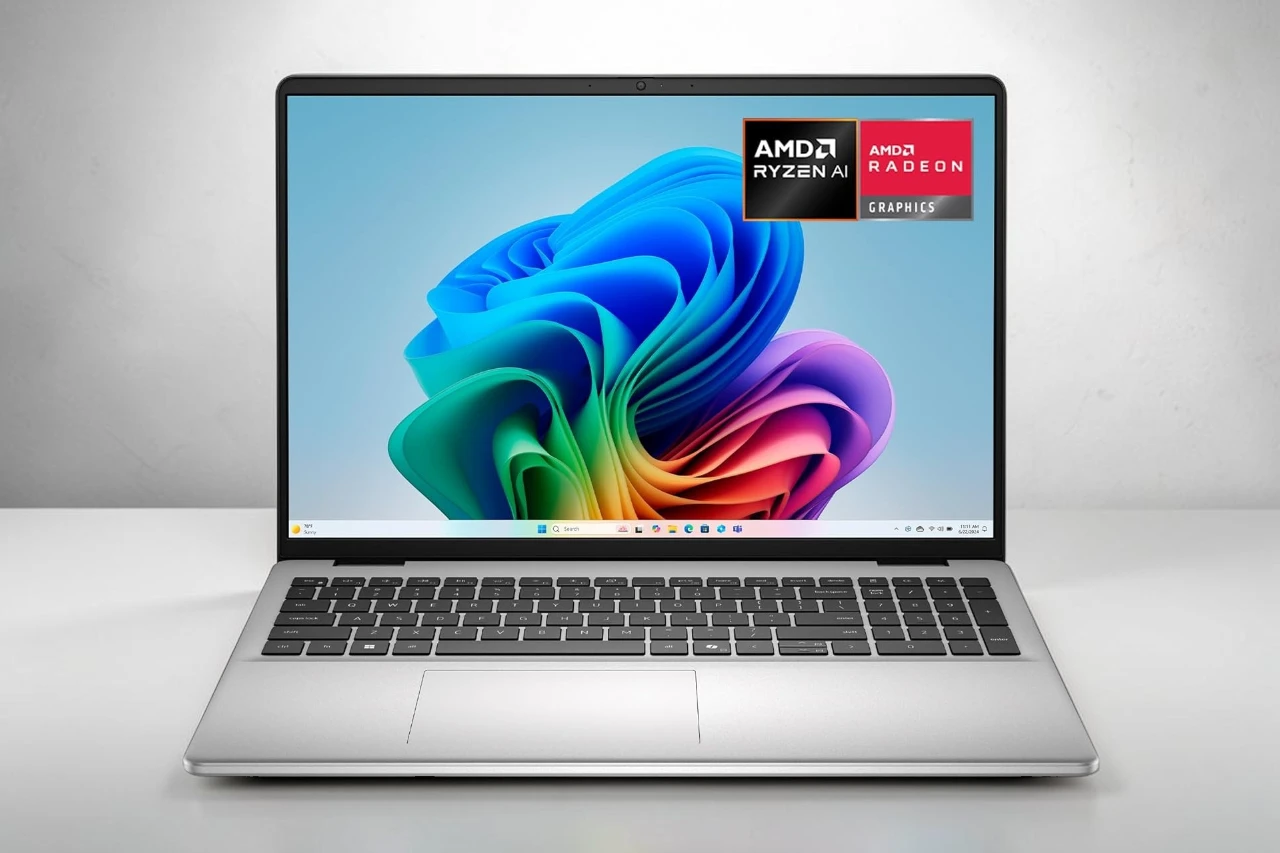
The Dell 16 DC16256 is a 16-inch laptop aimed at professionals, students, and home users who want a capable daily machine without paying flagship prices. It runs on AMD’s Ryzen AI 7 350 processor, carries 32GB of DDR5 RAM, and ships with a 1TB SSD. The biggest question to ask before buying: does this combination of specs, screen, and design actually justify the cost for your specific needs?
The strongest case for this laptop is the generous RAM and storage paired with a spacious 2K touchscreen, which together create a genuinely comfortable all-day work setup. The main trade-offs are integrated graphics only and a 64Wh battery, which limits gaming and may fall short for heavy travelers wanting all-day freedom.
The DC16256 fits comfortably in the productivity laptop category, competing with similar business-oriented machines from Lenovo and HP. It is not a gaming laptop. It is not a content creation powerhouse. It is a well-equipped, practical laptop for people who spend most of their time in productivity apps, video calls, and web-based work.
Bottom Line
The Dell 16 DC16256 is a solid choice for work-from-home professionals, students, and light business users who want a roomy screen, fast everyday performance, and a refined build.
Dell 16 Laptop DC16256 At A Glance
Who This Laptop Fits Best
This machine suits people who multitask across many browser tabs, work in Microsoft 365 or Google Workspace, and join video calls regularly. Students who need a capable, full-size laptop for research and writing will find it comfortable. Remote workers who prioritize screen real estate and reliability will also find it practical.
It is not the right fit for dedicated gamers, video editors working with 4K footage, or users who need Thunderbolt connectivity.
Main Buying Reasons
- 32GB of DDR5 RAM handles heavy multitasking without slowdowns
- The 16-inch 2K touchscreen offers more vertical space than most 16:9 displays
- A full-size keyboard with a number pad suits spreadsheet-heavy work
- Wi-Fi 6E and Bluetooth 5.3 provide modern wireless connectivity
- 1TB SSD delivers plenty of storage without an external drive
- Windows 11 Home with Copilot+ integration is included out of the box
16-Inch 2K Touchscreen Display
16:10 Workspace Advantages
The 16:10 aspect ratio is a genuine productivity advantage. Compared to a standard 16:9 screen, it gives you noticeably more vertical screen space. That means fewer scrolls through long documents, more rows visible in spreadsheets, and less cramping when using two windows side by side.
The 1920×1200 resolution at 16 inches is sharp enough for crisp text and clear images. It is not a 4K display, but at this screen size the difference is rarely noticeable in daily use.
ComfortView and Matte Screen Benefits
Dell’s ComfortView technology reduces blue light output, which matters for people who spend six or more hours a day staring at a screen. The matte anti-glare coating is also a practical choice for office environments and rooms with mixed lighting.
The maximum brightness sits at 300 nits, which is adequate for indoor use. Bright outdoor or window-side use may feel limiting. The color gamut covers 45% NTSC, which is acceptable for documents and video calls but not suitable for professional color work.
Ryzen AI 7 Performance With 32GB RAM
Everyday Speed and Multitasking
The AMD Ryzen AI 7 350 is a capable processor for daily productivity tasks. It runs at a base speed of 2 GHz with a boost up to 5 GHz across eight cores. In practical terms, that means smooth performance when juggling multiple browser tabs, running Office apps, streaming video, and using communication tools like Teams or Zoom simultaneously.
The 32GB of DDR5 RAM running at 5600 MHz is a significant asset here. Most competing laptops in this price range ship with 16GB. The extra headroom means the system rarely feels constrained, even with demanding workflows.
What Integrated Radeon Graphics Can Handle
The AMD Radeon integrated graphics share system memory rather than using dedicated VRAM. For everyday productivity, this is perfectly fine. Web browsing, video playback, presentations, and light photo editing all run without issues.
For gaming, the picture is more limited. Casual or older titles may run at lower settings. Modern AAA games are not a realistic use case. Video editors working with 1080p footage may find it manageable, but 4K editing will likely cause bottlenecks. If graphics performance is a priority, a dedicated GPU laptop is a better choice.
1TB SSD Storage and Daily Productivity Design
Full-Size Keyboard With Number Pad
The inclusion of a number pad is genuinely useful for finance professionals, accountants, and anyone who works with spreadsheets or data entry regularly. Many 16-inch laptops still omit it, so this is a practical advantage.
The keyboard is backlit with a carbon black finish, and the layout is full-size. The fingerprint reader is integrated into the keyboard area for quick, secure login. We cannot confirm key travel depth or typing feel from available data, so hands-on testing before purchase would be worthwhile if typing comfort is a top priority.
Fingerprint Reader and Practical Extras
Beyond the fingerprint reader, the Dell 16 DC16256 includes a memory card slot for photographers or users who transfer files from SD-based devices. The touchscreen adds flexibility for quick navigation or annotation, though it is not a convertible or 2-in-1 design.
The aluminum build keeps the chassis at 4.2 pounds with a slim 0.68-inch profile. That is reasonably portable for a 16-inch laptop, though not as light as ultrabooks. Storage is not specified as upgradeable in the available product data, so users should treat 1TB as the working capacity.
Camera, Connectivity, and Everyday Usability
FHD Webcam for Calls and Meetings
The front-facing RGB FHD camera includes wide dynamic range and temporal noise reduction. In practice, this means it should handle uneven lighting better than basic webcams, producing cleaner images in dim rooms or bright window-lit spaces.
For regular video calls on Teams, Zoom, or Google Meet, this is a capable setup. It is not a specification typically found in budget laptops. Exact frame rate and lens details are not specified in the available data.
Ports, Wi-Fi 6E, and Wireless Convenience
Connectivity is functional but not extensive:
| Port/Feature | Detail |
|---|---|
| USB-A | USB 3.2 Gen 1 |
| USB-C | USB 3.2 Gen 2 |
| HDMI | Video output to external displays |
| SD Card Slot | Full-size, useful for media transfer |
| Wi-Fi | Wi-Fi 6E (802.11ax) |
| Bluetooth | Version 5.3 |
Three total ports is a notable limitation. Users who regularly connect external drives, monitors, and peripherals simultaneously may need a USB hub. Wi-Fi 6E is a modern standard that delivers faster, more stable wireless where supported. Bluetooth 5.3 covers wireless peripherals reliably.
Pros & Cons
Pros:
- 32GB DDR5 RAM provides strong multitasking headroom above most competitors
- 1TB SSD covers most users without requiring an external drive
- 16:10 2K touchscreen offers more usable vertical workspace than 16:9 displays
- Full-size keyboard with number pad suits data-heavy work
- Wi-Fi 6E and Bluetooth 5.3 are current-generation wireless standards
- RGB FHD webcam with dynamic range improvement for video calls
- Aluminum chassis at 0.68 inches thin for a 16-inch laptop
- Fingerprint reader for convenient, secure login
- Windows 11 Home with Copilot+ included
- 1-year onsite service warranty adds practical support value
Cons:
- Integrated graphics only limits gaming and intensive creative work
- Only three ports requires a hub for users with multiple peripherals; no Thunderbolt listed
- 300-nit brightness may feel dim in bright or outdoor environments
- 45% NTSC color gamut is not suitable for color-accurate professional work
- 64Wh battery may not cover a full day of heavy use for frequent travelers
- No dedicated GPU option in this configuration
Customer Reviews
What Buyers Like Most
The Dell 16 DC16256 is well-rated among buyers who have reviewed it. Most positive feedback centers on the display quality, noting that the 16:10 aspect ratio and sharp resolution make document work and web browsing noticeably more comfortable. The generous RAM is frequently mentioned as a reason buyers chose this model over competing options with less memory.
Build quality and the keyboard layout, including the number pad, also draw consistent praise from buyers who use the laptop for office-style work.
Common Concerns
The limited number of ports comes up as a frustration for buyers who connect multiple peripherals. Some users note that the laptop benefits from a hub or dock for a complete desktop setup.
Brightness in well-lit rooms is another area where a portion of buyers feel the display could go higher. There are no widespread complaints about performance for productivity tasks, which aligns with what the hardware is designed to handle. Given the relatively small total number of reviews, buyer feedback is still developing and should be weighed accordingly.
Conclusion
The Dell 16 DC16256 is a practical, well-specified productivity laptop that suits a clear type of buyer. The combination of 32GB DDR5 RAM, a 1TB SSD, a spacious 16:10 2K touchscreen, and a full keyboard with number pad makes it a strong daily driver for work-from-home professionals, business users, and students.
It is not the right pick for gamers, creative professionals who need accurate color reproduction, or users who frequently work outdoors. The three-port limitation and integrated-only graphics are genuine trade-offs worth taking seriously before purchasing.
For someone who needs a capable, well-built laptop primarily for productivity, communication, and everyday computing, the Dell 16 DC16256 delivers meaningfully better RAM and storage than many competitors at a similar price point. That makes it a competitively positioned option in the productivity laptop segment, and worth serious consideration for the right buyer.
| Preview | Product | Price | |
|---|---|---|---|

| Dell 16 Laptop DC16256-16.0-inch 16:10 2K Touchscreen Display, AMD Ryzen AI 7 350 Processor, AMD… |
$847.81 | View on Amazon |




