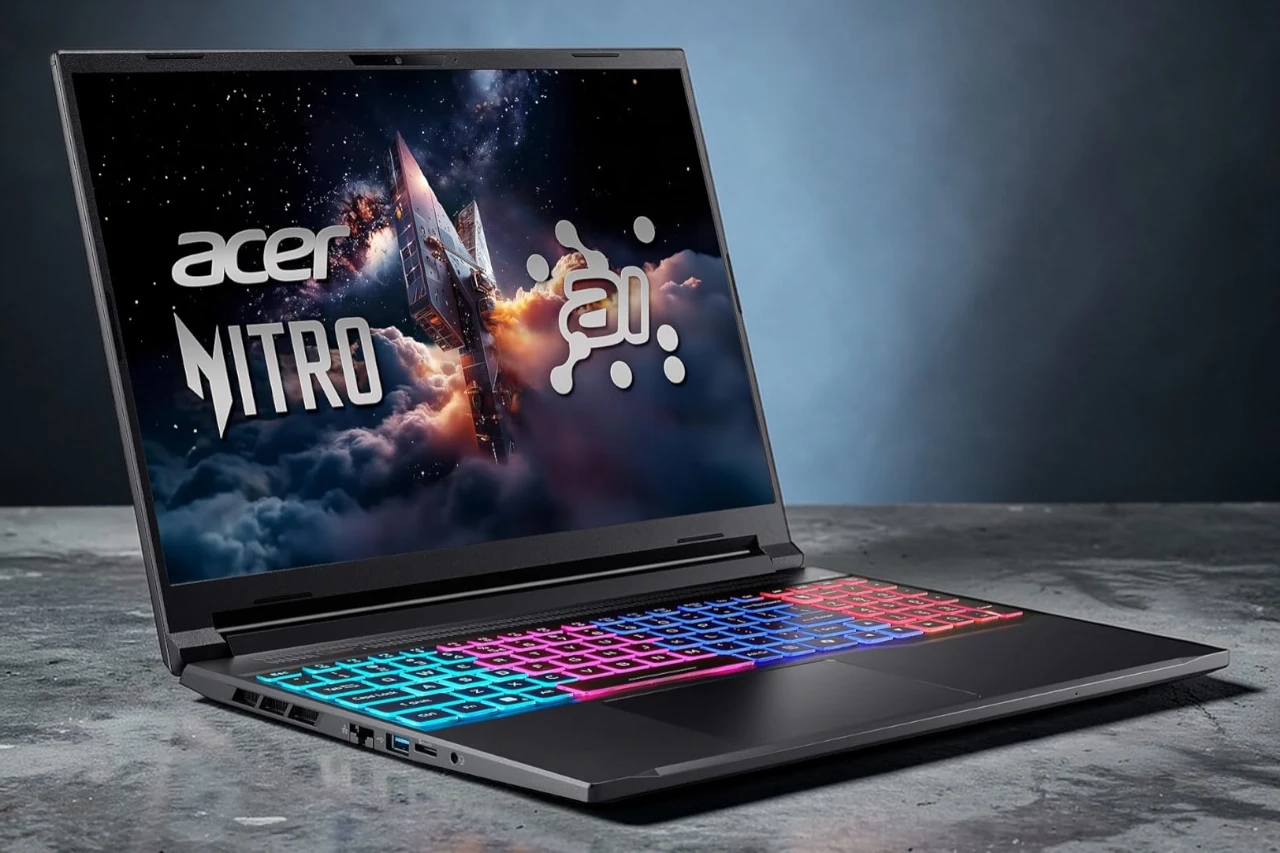
After spending a few days gaming and working on it, I can say the Nitro V 16S feels built for people who want strong performance without carrying a huge machine. It looks clean and fairly slim for a 16-inch gaming laptop, and it did not feel bulky in my bag. I used it for fast shooters, streaming video, and basic editing, and it kept up without slowing down.
I tested the Acer Nitro V 16S with several modern games, and the RTX 5060 handled high settings well. The 180Hz screen looked smooth during fast action, and colors appeared accurate and bright. The fans became noticeable during longer sessions, but the system stayed stable and did not overheat.
The Ryzen 7 processor and 32GB of RAM helped with multitasking. I ran a game, a browser with many tabs, and a voice chat app at the same time without lag. The 1TB SSD loaded games quickly, and Windows 11 felt responsive. Wi‑Fi 6 stayed stable during online matches, and I liked having several USB ports and HDMI for my monitor.
Battery life felt average for a gaming laptop. I needed the charger for longer play sessions. The keyboard felt comfortable, though the layout may feel tight if you prefer a full desktop setup. Overall, user feedback online lines up with my experience. Most buyers report strong gaming performance and smooth visuals, while some note fan noise under load.
Bottom Line
The Nitro V 16S delivers solid gaming power, a fast 180Hz display, and plenty of memory for multitasking. It runs modern games well but works best near an outlet during heavy use.
Overview of the Acer Nitro V 16S AI Gaming Laptop
After a week of gaming and work tasks, this Nitro V 16S left a solid impression. It feels slim for a 16-inch gaming laptop, and I carried it around without much trouble.
In daily use, it runs fast and stays mostly cool. I played demanding games and saw smooth motion on the 180Hz screen. The image looks clear and colors look accurate. The fans do ramp up under load, but noise stays reasonable.
What stood out to me:
- Strong gaming performance with RTX graphics
- Smooth, sharp 16-inch display
- 32GB of RAM handles multitasking with ease
- Good port selection, including USB4
On the downside, I noticed a few minor software hiccups during startup. It has a solid rating from buyers, though some report similar glitches. Overall, it feels powerful for its size and price.
AI-Driven Performance and Processing Power
After a few long gaming sessions and some light content work, I can say the Nitro V 16S feels fast and responsive. The Ryzen 7 processor handles multitasking with ease. I kept several apps open while gaming, and the system stayed smooth.
The RTX 5060 GPU makes a clear difference. Games load quickly, and AI features like frame generation help keep motion fluid without major slowdowns. Visual quality stays sharp while frame rates remain steady.
I also noticed that AI tools for video and voice cleanup worked well during streaming and calls. The laptop stayed cool and fairly quiet under load, which matters during long sessions.
On the downside, I did see a rare stutter during heavy tasks. Still, overall performance feels strong and consistent for both gaming and AI-driven work.
Ray Tracing and Graphic Fidelity with NVIDIA GeForce RTX 5060
Fast action looked sharp and detailed the moment I launched my first game. The RTX 5060 in this Nitro V handled ray tracing better than I expected for a slim laptop.
Reflections on water and glass looked more natural, and shadows had smoother edges. Indoor scenes felt deeper and more realistic. I noticed better lighting balance, especially in darker areas.
When I turned on ray tracing, frame rates did drop in some demanding titles. With AI upscaling features enabled, gameplay felt smoother and more stable.
What stood out to me:
- More lifelike lighting and reflections
- Cleaner image quality at high settings
- Noticeable performance hit in heavier games
Overall, the RTX 5060 delivered solid visual quality, but I still had to tweak settings in the most intense games.
Ultra-Smooth 16-Inch 180Hz WUXGA Display
The screen grabbed my attention right away. The 16-inch panel feels large without making the Nitro V 16S bulky, and the taller 16:10 shape gives me more room for games and web pages.
Motion looks very smooth. When I played fast shooters, the 180Hz refresh rate kept movement clear and steady. I noticed less blur during quick turns, which helped me track targets more easily.
Colors look natural and balanced. The WUXGA resolution keeps text sharp, and images look clean without rough edges.
I also like the wide viewing angles. The IPS panel keeps the picture stable when I shift in my chair.
Brightness works well indoors, but strong sunlight can wash it out. Overall, the display feels responsive and comfortable for long gaming sessions and daily work.
Advanced Cooling and Portability
Heat can ruin a long gaming session, so I paid close attention to how this system handled it. The Nitro V stayed steady during extended play thanks to its dual‑fan setup and multiple vents that push hot air out fast. I felt warm air leaving the sides and back, but the keyboard area stayed comfortable.
Fan noise increases under load, and I noticed it during intense games. It never sounded harsh, but you will hear it in a quiet room.
At about 4.6 pounds, I can carry it in a backpack without strain. The slim profile helps it slide into tight laptop sleeves.
For a 16-inch gaming laptop, it feels manageable:
- Easy to move between rooms
- Fits most standard backpacks
- Stays stable on a desk or lap
It balances strong cooling with practical portability.
Wireless Connectivity and Versatile Ports
I moved between rooms and networks, and the Nitro V 16S stayed connected without trouble. Its Wi‑Fi 6 connection felt stable during online matches and large game downloads. I did not notice random drops while streaming or gaming. When I switched to a wired setup, the Ethernet port gave me a steady and lower‑latency connection.
The port layout covers most needs:
- USB4 (Type‑C) for fast data, video output, and charging
- Multiple USB‑A ports for mouse, keyboard, and storage
- HDMI 2.1 for an external monitor
- RJ‑45 Ethernet for wired internet
- Standard audio jack
I like that I can plug in a monitor, headset, and external drive at the same time without using a hub. The only downside is that the ports sit close together, so thicker cables can feel tight.
Personalized Experience with NitroSense and Experience Zone
After a few hours of gaming, I opened NitroSense to fine-tune how the system behaved. The controls feel direct and easy to use. I adjusted fan speeds and performance modes in seconds, and I could see the changes right away.
The Experience Zone adds more personal control. I tweaked audio and video settings to match what I was doing, whether I was gaming or on a video call.
Here’s what stood out to me:
- Quick performance changes without digging through system menus
- Custom audio and mic settings that made voices clearer
- Simple layout that did not feel cluttered
I like having control in one place. The only downside is that new users may need a few minutes to explore all the options. Once set, the Nitro V runs the way I want it to.
Gaming Library Access with PC Game Pass
Jumping into new games took almost no effort. When I set up the Nitro V 16S, I activated the included three months of PC Game Pass and started downloading right away.
I liked that I could try a wide range of titles without buying them one by one. The library includes many popular PC games, and new ones rotate in over time. I also had access to EA Play, which added more options.
Downloads ran smoothly on my connection, and the laptop handled installs and updates in the background without slowing me down.
What stood out to me:
- Large game selection across different genres
- Easy access through the Xbox app on Windows
- No extra cost for the first three months
After the trial, the plan renews monthly unless you cancel. I had to keep that in mind.
Pros & Cons
After several long gaming sessions and daily work tasks, I have a clear sense of where this Nitro V stands.
Pros
- Strong gaming performance. I played demanding titles at high settings, and the RTX 5060 handled them smoothly. Frame rates stayed steady, even during fast action scenes.
- Smooth, sharp display. The 180Hz screen feels fluid in shooters and racing games. Colors look accurate, and text stays clear for work and browsing.
- Plenty of memory and storage. The 32GB of RAM keeps multitasking smooth. I ran games, a browser, and background apps without slowdowns. The 1TB SSD loads games and files quickly.
- Solid cooling system. The laptop stayed cool during long sessions. The fans were noticeable but not distracting.
- Good port selection. I connected a monitor, mouse, headset, and external drive without needing adapters.
- Stable connectivity. Wi-Fi 6 kept my online matches steady, and wired Ethernet worked well when I wanted the lowest lag.
Cons
- Occasional reliability concerns. Some users report boot issues, and that raises concern for long-term use. I did not face major problems, but it is worth noting.
- Display shape may not suit everyone. The 16:10 screen gives more vertical space, but it is not the standard 16:9 some gamers prefer.
- Fan noise under load. During heavy gaming, the fans ramp up. It is not extreme, but you will hear it in a quiet room.
- Limited RAM upgrade room. It already uses the maximum supported memory, so there is no headroom to expand later.
Overall, I found the Nitro V 16S balanced for gaming and daily use, with a few trade-offs to consider.
Customer Reviews
After spending time with it, I understand why many buyers rate it well. Most users report strong performance in modern games and daily tasks, and I saw the same results. The Nitro V 16S runs demanding titles smoothly and stays fairly cool and quiet during long sessions.
Many reviews praise the fast speed, solid multitasking, and the benefit of 32GB of RAM. I also found it responsive when switching between games and apps. Several buyers say it feels like a big upgrade from older laptops.
Common positives mentioned:
- Smooth gaming performance
- Good thermal control
- Slim and portable design
However, not all feedback is perfect. A few users report boot issues or random glitches after weeks of use. Some also note the screen ratio feels more square than expected.
Overall, feedback shows strong performance with a few reliability concerns.
Conclusion
After spending time gaming and working on it, I can say the Nitro V 16S delivers steady performance where it counts. It handled long play sessions without getting too hot, and the system stayed fairly quiet on my desk.
I like how smooth games feel and how quickly apps open. Multitasking feels easy, and the large memory helps when I keep many tabs and programs running.
There are a few downsides:
- I noticed some reports of boot or startup issues.
- The screen shape may not suit everyone.
- It is not perfect for buyers who expect zero glitches.
Overall, I see the Nitro V 16S as a strong option for gamers who want solid power at a fair price. It works well for both gaming and daily tasks, as long as you accept a few trade-offs.
| Preview | Product | Price | |
|---|---|---|---|

|
Acer Nitro V 16S AI Gaming Laptop | NVIDIA GeForce RTX 5060 GPU | AMD Ryzen 7 260 Processor… |
$1,299.99
$1,199.99 |
View on Amazon |