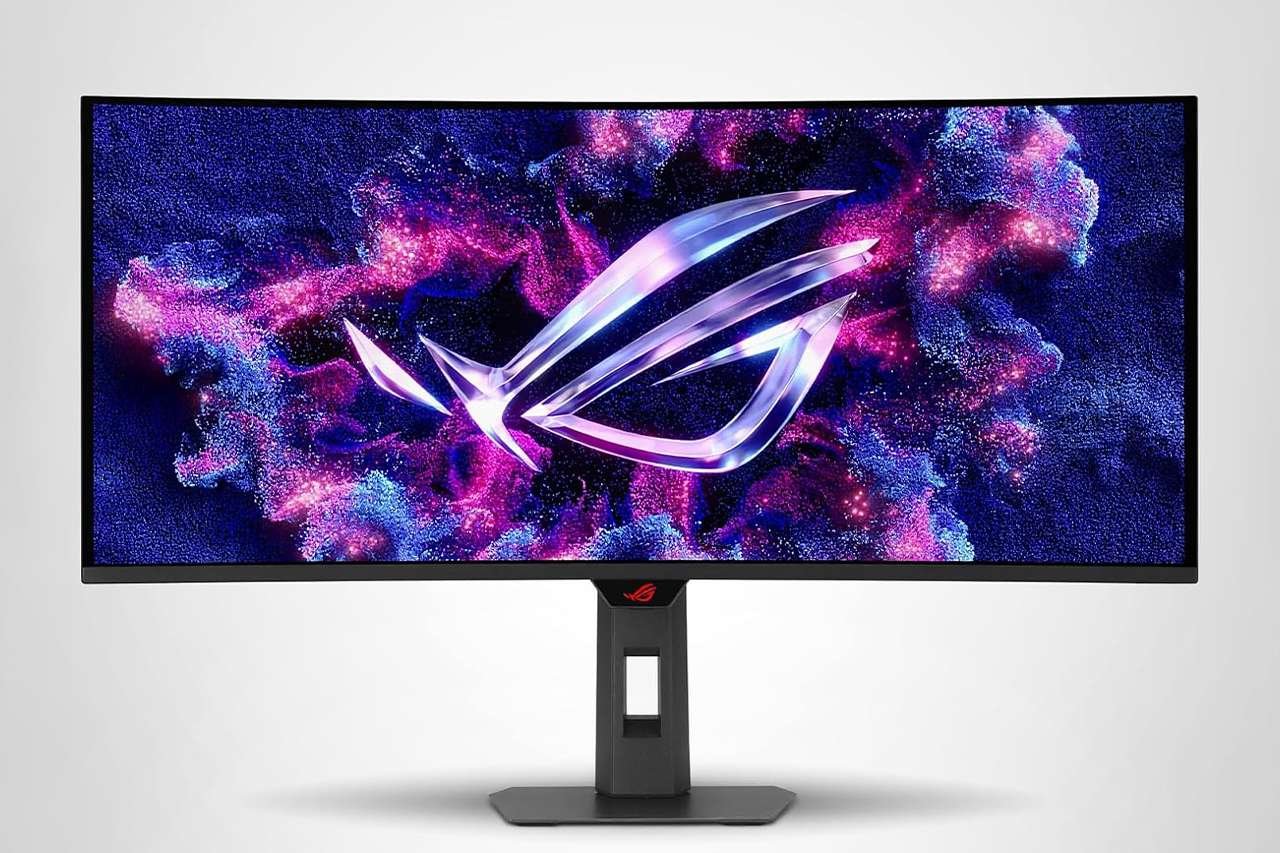
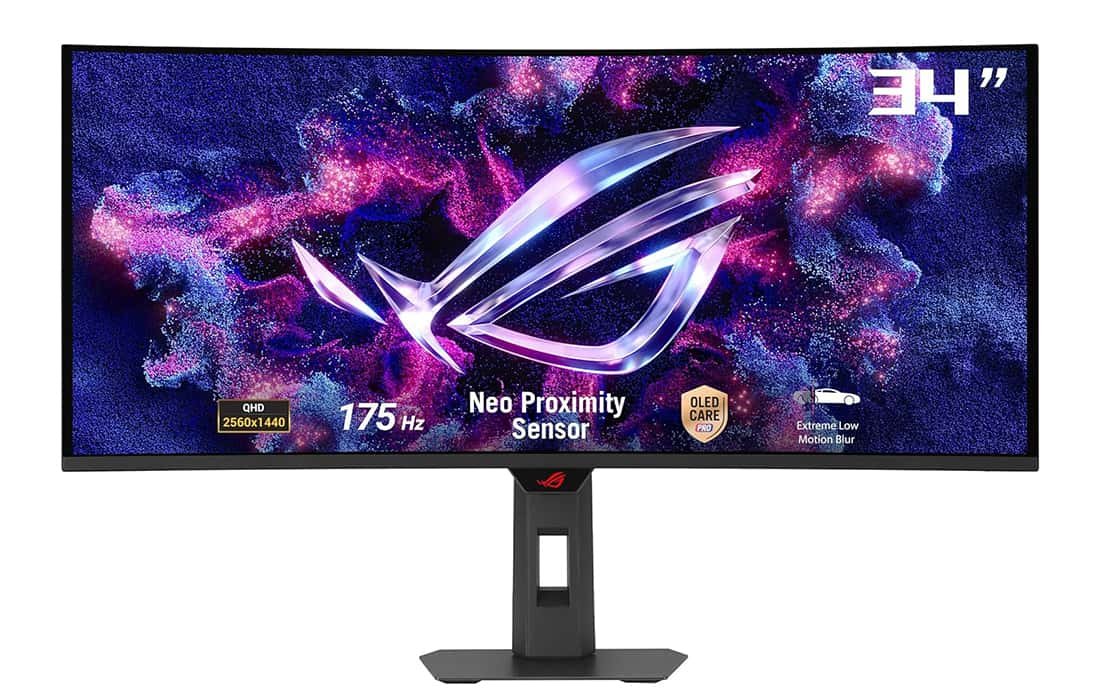
ASUS ROG Strix XG34WCDG — 34" 175Hz QD-OLED Ultrawide
Our verdict: a stunning 34-inch QD-OLED ultrawide that blends elite 175Hz gaming performance with creator-grade color accuracy.
- 34" 3440×1440 QD-OLED with 1800R curve and 99.3% DCI-P3 for immersive, color-accurate gaming and creation.
- 175Hz refresh rate, 0.03ms response, ELMB and VRR for ultra-smooth, blur-free competitive gameplay.
- OLED Care Pro, custom heatsink and Neo Proximity Sensor help protect the panel from burn-in for long-term use.
- Panel
- 34" QD-OLED, 1800R
- Resolution
- 3440 × 1440 UWQHD
- Refresh Rate
- 175 Hz
- Response Time
- 0.03 ms GtG
The ASUS ROG Strix XG34WCDG is one of those monitors that tries to do almost everything at once. It’s a 34-inch ultrawide QD-OLED panel with a 3440×1440 resolution, a blisteringly fast 175 Hz refresh rate, and an absurdly low 0.03 ms response time. On top of that, ASUS layers in its OLED Care Pro suite, a custom heatsink, Creator-grade color accuracy, and all the usual ROG gaming extras.
On paper, this is a “do-it-all” display for people who want a cinematic ultrawide experience that can handle sweaty competitive matches at night and color-critical work during the day. In practice, it comes very close to that promise.
This review walks through the XG34WCDG from a real-world perspective—how it looks on your desk, how it feels in games and creative apps, how the OLED protections work, and who should seriously consider buying it.
Key Specifications at a Glance
- Panel type: 34" QD-OLED, 1800R curved
- Resolution: 3440 × 1440 (UWQHD)
- Aspect ratio: 21:9 (ultrawide) / approx. 2.39:1
- Refresh rate: 175 Hz
- Response time: 0.03 ms (GtG)
- Color: 99.3% DCI-P3, true 10-bit, Delta E < 2
- HDR: VESA DisplayHDR 400 True Black
- Sync: AMD FreeSync Premium Pro, NVIDIA G-SYNC compatible
- Surface: Matte, anti-glare
- Special features:
- ASUS OLED Care Pro with Neo Proximity Sensor
- Custom heatsink and graphene film cooling
- Extreme Low Motion Blur
- Uniform Brightness setting
- ROG Gaming A.I features including Dynamic Crosshair
- ASUS DisplayWidget Center software
- Connectivity (high level): DisplayPort, USB connection for hub/control, USB-C with up to 15 W power delivery
- Warranty: 3-year warranty
- Extras in the box:
- DisplayPort cable
- USB Type-B to Type-A cable (for USB/DisplayWidget)
- Power cord and adapter
- Microfiber cloth
- VESA mount kit
- ROG pouch
- Calibration report
- ROG stickers
- Quick start guide and warranty card
- Bonus: 3-month Adobe Creative Cloud access (offer valid until 8/31/2026)
Design & Build Quality
ASUS positions the XG34WCDG as a “one for all” monitor, and the design reflects that balance between aggressive gaming aesthetics and studio-friendly sophistication.
Cyberpunk-inspired but not overdone
The front is all business: a tall, sturdy stand, narrow bezels, and that expansive 34-inch curved panel. The curve is 1800R, which feels immersive without being so extreme that straight lines look distorted in spreadsheets or timelines.
From the back, the ROG DNA is far more obvious. Angular lines, a large ROG logo, and subtle styling cues give it that cyberpunk-inspired look without turning your desk into a carnival of lights. It looks modern and premium, and it fits nicely in both a gaming battlestation and a minimal work setup.
Compact stand and ergonomics
The stand is compact for a 34-inch ultrawide, which helps if you’re working with a shallower desk. You don’t lose the screen real estate, but you gain a bit of space in front for a keyboard, drawing tablet, or audio interface.
Ergonomic adjustments are generous for this size class:
- Height adjustment to dial in the perfect eye level
- Tilt to keep reflections under control
- Swivel to angle the screen toward different seating positions
It’s not a pivot-to-portrait kind of monitor (ultrawides almost never are), but for everyday use and gaming it’s flexible enough. If you want a custom arm, ASUS includes a VESA mount kit in the box, which is a nice touch.
Frameless, with a superslim profile
The QD-OLED panel allows the screen to be very slim, and viewed from the side it looks sleek and modern. The bezels are extremely thin on the top and sides, which makes the image feel like it floats in front of you—especially in darker rooms.
On top of the monitor, ASUS also includes a built-in tripod socket, so you can mount a camera or streaming accessory directly above the display. For streamers and content creators, that means a natural eye-line without extra arms and clamps cluttering up your desk.
Overall, build quality feels solid, with minimal wobble and high-quality plastics. Nothing creaks when you adjust the height or tilt, and the stand keeps the big panel stable, even during intense keyboard or mouse action.
Setup, Connectivity & What’s in the Box
Unboxing the XG34WCDG feels more like opening a piece of premium hardware than a generic office monitor. ASUS includes:
- DisplayPort cable (your best option for 175 Hz PC gaming)
- USB Type-B to Type-A cable to connect the monitor’s USB/control functions
- Power cord and adapter
- Microfiber cloth for safely cleaning the OLED panel
- VESA mount kit for third-party monitor arms
- ROG pouch (handy for storing cables or accessories)
- Factory calibration report
- ROG stickers, quick start guide, and warranty card
Setup is straightforward: attach the stand, plug in power and DisplayPort, then connect the USB cable if you want to use DisplayWidget Center and USB functions. The factory calibration report is reassuring, especially if you plan to do color-sensitive work—you’re not starting from a wild out-of-the-box profile.
There’s also a USB-C port with 15 W power delivery, which is perfect for smaller devices, docked handheld consoles, or simply reducing USB-charger clutter. It won’t power a big workstation laptop on its own, but it’s handy for topping up accessories.
QD-OLED Panel & Image Quality
The main reason to consider this monitor is simple: the QD-OLED panel. It combines OLED’s perfect blacks and near-instant pixel response with quantum-dot color performance, and the result is frankly stunning.
Contrast and black levels
Because each pixel can switch off individually, OLED panels deliver blacks that LCDs simply cannot match. On the XG34WCDG, dark scenes in games and movies look truly black, not dark gray. When you’re playing titles with a lot of contrast—space shooters, horror games, neon-lit cityscapes—the depth and “pop” of the image is on another level.
This is further reinforced by the monitor’s VESA DisplayHDR 400 True Black certification, which is specifically tuned for OLED panels and low-level shadow detail rather than just chasing high peak brightness. Shadow gradients look smooth, with subtle detail in very dark scenes instead of washed-out blotches.
Color coverage and accuracy
For content creation and high-end gaming, color performance matters just as much as contrast. The XG34WCDG covers 99.3% of the DCI-P3 color gamut and supports true 10-bit color, making it suitable for HDR gaming, photo editing, and video color work.
ASUS also factory calibrates the panel to a Delta E < 2, which means color errors are very low and largely imperceptible in real-world use. Combined with the included calibration report, you get a level of out-of-the-box accuracy that makes this monitor more than just a toy for gamers—it’s a viable tool for professional creators.
Resolution and sharpness
At 3440×1440 UWQHD on a 34-inch panel, you get a pixel density that strikes a comfortable balance between sharpness and performance requirements. Text and UI elements appear crisp without forcing you to scale your operating system UI, and modern GPUs can realistically drive this resolution at high frame rates in many titles.
Is it as razor-sharp as a 4K panel? No. But because of the ultrawide aspect ratio, the immersion you gain is often more noticeable than the tiny step down in pixel density, especially at typical viewing distances.
Matte coating and uniform brightness
ASUS uses a matte screen surface, which diffuses reflections and makes the monitor usable in brighter rooms. It avoids the mirror-like reflections that glossy OLEDs can suffer from.
There’s also a Uniform Brightness setting that helps keep the panel’s overall brightness consistent regardless of how much of the screen is lit. This is important on OLEDs, where aggressive ABL (Automatic Brightness Limiting) can sometimes cause big changes in brightness when transitioning between small bright areas and full-screen white documents. With uniform brightness, the XG34WCDG behaves more predictably when you’re browsing, editing documents, or working in bright UIs.
HDR Performance
HDR on OLED is less about blinding peak brightness and more about the combination of black depth, color, and precise highlights. That’s exactly where the XG34WCDG excels.
- Small bright elements—UI highlights, specular reflections, neon signs—really shine against deep OLED blacks.
- Gradients in the sky or dark scenes stay smooth thanks to the 10-bit panel.
- Colors remain vivid but not cartoonishly oversaturated when properly calibrated.
Because it’s rated at DisplayHDR 400 True Black rather than some massive HDR 1000 spec, you shouldn’t expect it to light up your entire room. But for gaming and movie watching in typical ambient lighting, the HDR experience feels rich and cinematic without needing extreme brightness.
Gaming Performance
This is a ROG Strix display, so gaming performance is front and center—and the XG34WCDG delivers.
175 Hz refresh and 0.03 ms response
The combination of 175 Hz refresh rate and 0.03 ms GtG response time makes motion feel exceptionally fluid. Fast camera pans in FPS games, racing titles, or battle royales stay sharp with very little smearing or ghosting.
OLED’s inherent speed means you don’t have to lean as heavily on overdrive settings as you would on an IPS or VA monitor. ASUS still includes its Extreme Low Motion Blur technology to further cut down perceived blur, but even without aggressive settings the image remains crisp in motion.
FreeSync Premium Pro & G-SYNC compatibility
The XG34WCDG supports AMD FreeSync Premium Pro and is NVIDIA G-SYNC compatible, which keeps frames in sync with the panel’s refresh rate. The benefit is simple: far less tearing and judder, plus smoother transitions when your frame rate fluctuates.
This matters a lot at 3440×1440, where performance can vary depending on the game and your GPU. With VRR enabled, you still get a smooth experience even when frame rates dip below the maximum.
ROG Gaming A.I and Dynamic Crosshair
ASUS adds a layer of gaming-oriented intelligence with its ROG Gaming A.I features. The standout one here is Dynamic Crosshair:
- The monitor automatically adjusts the crosshair color so it contrasts with the background, making it easier to track your aim in visually busy scenes.
- This is particularly useful in games with complex environments or visual effects that tend to swallow default in-game crosshairs.
You also get the usual GamePlus enhancements, such as timers, FPS counters, and other overlays that can help you practice or monitor performance. Combined with the ultrawide field of view, this monitor gives you both a competitive edge and a more immersive visual experience.
Ultrawide immersion
The 21:9 aspect ratio and 1800R curvature create a wrap-around feel that pulls you into the game. In titles that support ultrawide resolutions properly:
- Racing games put you “in the cockpit.”
- First-person shooters feel more natural, with peripheral vision filled by in-game environments.
- Open-world exploration games become more cinematic and sweeping.
Do note that not all games handle ultrawide perfectly—some older or competitive titles may limit FOV or stretch UI elements—but modern AAA games generally work beautifully at 3440×1440.
Productivity & Content Creation
While the ROG logo screams “gaming,” the XG34WCDG is also aimed at creators and power users who need serious screen real estate and color accuracy.
Ultrawide workflow
The 34-inch ultrawide format makes it easy to:
- Place a full-width timeline in your video editor and still keep room for bins, scopes, and preview windows
- View two documents or browsers side by side without feeling cramped
- Keep reference material open while you work in your main app
For developers, writers, and data analysts, the extra horizontal space can quickly become addictive—you might find it difficult to go back to a standard 16:9 layout.
Creator-grade color and calibration
Thanks to its 99.3% DCI-P3 coverage, true 10-bit color, and factory-calibrated Delta E < 2, the XG34WCDG is well-suited for:
- Photo editing in wide-gamut working spaces
- Color-grading HDR or SDR footage (within the brightness limitations of OLED HDR 400)
- Graphic design and illustration with accurate, consistent colors
The bonus 3-month Adobe Creative Cloud subscription is a thoughtful incentive if you’re just getting serious about creative work or considering adding Adobe tools to your workflow.
Text and long-session comfort
The matte coating plus Uniform Brightness mode make this OLED more comfortable for long work sessions than many glossy gaming-focused OLEDs. You don’t get harsh reflections, and brightness doesn’t jump around dramatically when switching between dark games and white office windows.
For extra comfort, you can use the monitor’s blue-light-filter settings and tweak color temperature to match your room lighting.
OLED Care Pro & Burn-In Protection
One of the biggest concerns people have with OLED monitors is burn-in—the risk that static elements like taskbars, HUDs, or logos may leave permanent shadows over time. ASUS tackles this head-on with its OLED Care Pro suite and hardware-level cooling.
Hardware: custom heatsink and graphene film
Inside the monitor, ASUS uses an advanced custom heatsink combined with graphene film and optimized internal airflow. Better thermal performance helps keep panel temperatures lower, and cooler OLED pixels are less prone to burn-in and image retention over time.
You don’t see this system working, of course, but you do feel the effect: the panel doesn’t get excessively hot even during long gaming sessions.
Software: OLED Care Pro features
On the software side, OLED Care Pro brings a long list of protective measures, many of which are accessible via the on-screen display or DisplayWidget Center:
- Neo Proximity Sensor – Precisely detects when you move away from the monitor and can dim or switch the screen to black to reduce static image time.
- Boundary Detection – Monitors static areas at the screen edges (like sidebars or HUDs) and can subtly adjust them to reduce burn-in risk.
- Pixel Cleaning & Pixel Move – Periodic maintenance routines and subtle pixel shifting to distribute wear more evenly.
- Logo Brightness Adjustment – Automatically lowers the brightness of static logos or icons.
- Screen Saver / Target Mode – Reduces static elements or introduces movement when inactivity is detected.
- Taskbar Detection – Identifies and protects common OS UI elements such as taskbars.
- Outer and Global Dimming Detection – Adjusts brightness on parts of the screen that remain static for extended periods.
These features work mostly in the background. You may occasionally see a brief prompt when pixel cleaning is suggested, or notice the screen dim slightly after you’ve stepped away, but during active use they’re largely unobtrusive.
The result is a monitor that not only looks fantastic but also gives you more confidence about longevity, especially if you plan to leave it on for many hours a day with static UI elements.
DisplayWidget Center: Software Control
While you can control everything via the traditional OSD joystick, ASUS’s DisplayWidget Center software is one of the highlights of the XG34WCDG.
With it, you can:
- Switch between picture modes (Racing, FPS, Cinema, sRGB, etc.) using your mouse
- Adjust brightness, contrast, color temperature, and gaming features from a desktop app
- Enable and tweak OLED Care Pro functions more conveniently
- Manage multi-screen setups and picture-by-picture/ picture-in-picture layouts
- Receive firmware update notifications and update the monitor directly
- Import and export custom display profiles, which is handy if you’re moving between PCs or sharing configurations with teammates
For users who frequently switch between gaming, creative work, and general desktop use, this software makes the monitor feel far more adaptable—no more leaning around the side to dig through nested OSD menus.
Everyday Experience
After all the specs and features, what is it actually like to live with the XG34WCDG day to day?
For gaming
If you primarily play on PC and enjoy immersive single-player games, fast shooters, or racing titles, this monitor is a joy:
- The combination of ultrawide aspect ratio, deep blacks, and fast refresh makes games feel cinematic and responsive.
- Dynamic Crosshair and the ROG gaming tools subtly improve usability without feeling like gimmicks.
- FreeSync/G-SYNC compatibility keeps motion smooth even when your frame rate isn’t locked at 175 fps.
Competitive esports players who demand the absolute highest refresh rates (240 Hz and above) might still opt for a smaller, faster 16:9 monitor, but for anyone who wants both immersion and responsiveness, 175 Hz at this resolution is a great sweet spot.
For work and creation
As a productivity and creative display, the XG34WCDG earns its keep:
- The ultrawide format boosts multitasking efficiency.
- Color accuracy and factory calibration make it a reliable tool for photo/video work.
- The matte screen and uniform brightness help reduce eye strain during long sessions.
The main limitation to keep in mind is that OLED peak brightness is lower than that of the brightest mini-LED or high-end IPS monitors, especially in very bright, sunlit environments. In a typical home office or studio, however, brightness is more than adequate.
For media consumption
Ultrawide movies and modern cinematic content look fantastic. Black bars disappear on 21:9 content, and the deep OLED contrast gives you a real cinema-like feel. For 16:9 content (most TV and streaming material), you’ll see vertical side bars, but the image quality remains excellent.
Drawbacks and Things to Consider
No monitor is perfect, and the XG34WCDG is no exception. Here are the main caveats to weigh.
- Premium price – At its list price of around $999, this is a high-end purchase. You’re paying for OLED, ultrawide, and ROG features all at once. If you only need a basic gaming monitor or a simple office display, this is far beyond what you need.
- Brightness vs. bright rooms – While HDR looks great in typical environments, this isn’t a monitor meant to compete with strong direct sunlight. If your setup is in front of a large window with no blinds, a brighter mini-LED panel might still be more practical.
- Potential OLED worries – OLED Care Pro and the custom heatsink go a long way to reduce burn-in risk, but the nature of OLED still means you should be mindful of static elements. If you marathon static UI screens at maximum brightness every day, an LCD could still be a safer long-term choice.
- Ultrawide compatibility – Not every game or application plays perfectly with 21:9 resolutions. Some competitive titles limit FOV, and some streaming platforms or console setups may show black bars instead of using the full screen.
- USB-C power delivery is modest – The 15 W USB-C PD is nice for phones and accessories, but it won’t act as a full docking replacement for a power-hungry laptop. You’ll still use your laptop charger alongside it.
For many buyers, these trade-offs are acceptable, but they’re worth considering before you commit.
Who Is the ASUS ROG Strix XG34WCDG For?
This monitor makes the most sense for three main groups of users:
1. Enthusiast PC gamers
If you want an immersive ultrawide experience with OLED image quality and very high refresh rates, the XG34WCDG is squarely aimed at you. It’s ideal for:
- Single-player AAA titles where visuals matter
- Competitive gaming where fast response and VRR are critical
- Gamers who also care about aesthetics and want a premium-looking setup
2. Hybrid gamer-creators
If your day looks something like “edit videos or photos in the afternoon, then game at night,” this monitor is almost tailor-made for you:
- Wide gamut coverage and Delta E < 2 factory calibration support creative work
- The ultrawide layout improves timelines and multitasking
- OLED HDR and gaming features keep your evenings fun and immersive
The included Adobe Creative Cloud trial is the cherry on top for users nudging into pro-level content creation.
3. Power users and productivity enthusiasts
Even if you’re not a hardcore gamer or professional creative, you might simply want one truly excellent monitor that can handle everything:
- endless browser tabs,
- multiple windows at once,
- occasional AAA gaming,
- and watching movies in glorious ultrawide.
The XG34WCDG can absolutely serve as a “one display to rule them all” in that sense, provided you’re comfortable with the price and are mindful of OLED best practices.
Pros and Cons
Pros
- Stunning QD-OLED image quality with perfect blacks and vibrant colors
- 34" 3440×1440 ultrawide format with 1800R curve for immersive gaming and efficient multitasking
- 175 Hz refresh rate and 0.03 ms response time for exceptionally clear motion
- AMD FreeSync Premium Pro and G-SYNC compatibility for smooth, tear-free gameplay
- Creator-friendly: 99.3% DCI-P3, true 10-bit color, Delta E < 2 with factory calibration report
- OLED Care Pro with Neo Proximity Sensor and extensive burn-in protection tools
- Advanced custom heatsink and graphene film cooling for better long-term reliability
- Matte screen and Uniform Brightness setting for comfortable everyday use
- DisplayWidget Center software makes fine-tuning and updates painless
- Premium design with compact stand, thin bezels, and built-in tripod mount
- 3-year warranty and bonus 3-month Adobe Creative Cloud access
Cons
- High price compared with fast IPS or VA ultrawides
- OLED brightness is good but not ideal for very bright, sun-flooded rooms
- Ultrawide aspect ratio isn’t perfect for every game or console setup
- OLED technology still requires some care to avoid image retention in edge cases
- USB-C power delivery is too low to fully replace a laptop charger
| Preview | Product | Price | |
|---|---|---|---|

|
ASUS ROG Strix 34” Ultrawide QD-OLED HDR Gaming Monitor (XG34WCDG) - 3440x1440, 175Hz, 0.03ms... |
$982.61 |
View on Amazon |
Final Verdict
The ASUS ROG Strix XG34WCDG is a flagship-level monitor that truly leans into the strengths of QD-OLED. It pairs gorgeous contrast and color with a fast 175 Hz refresh rate, a responsive 0.03 ms pixel response, and a thoughtfully designed set of tools to protect the panel from long-term wear.
What makes it stand out is how well it balances roles. It’s not just a gaming display with flashy lights and marketing buzzwords. It’s also a serious tool for content creation, a productivity monster thanks to its ultrawide layout, and a genuinely premium piece of hardware that looks and feels at home in a high-end setup.
This is not the right monitor if you’re hunting for a budget-friendly option or if your workspace is flooded with direct sunlight all day long. But if you’re willing to invest in a single centerpiece display that can handle gaming, work, and creative projects with equal confidence, the XG34WCDG earns its asking price.
In short:
- For enthusiast PC gamers and hybrid gamer-creators, it’s one of the most compelling 34-inch ultrawide OLED options on the market.
- For productivity power users who want image quality and immersion in one package, it’s a superb all-rounder—provided the premium price fits your budget.
If you’ve been waiting for a monitor that can realistically stay on your desk for years and serve as the heart of both your gaming rig and creative workstation, the ASUS ROG Strix XG34WCDG deserves a very close look.