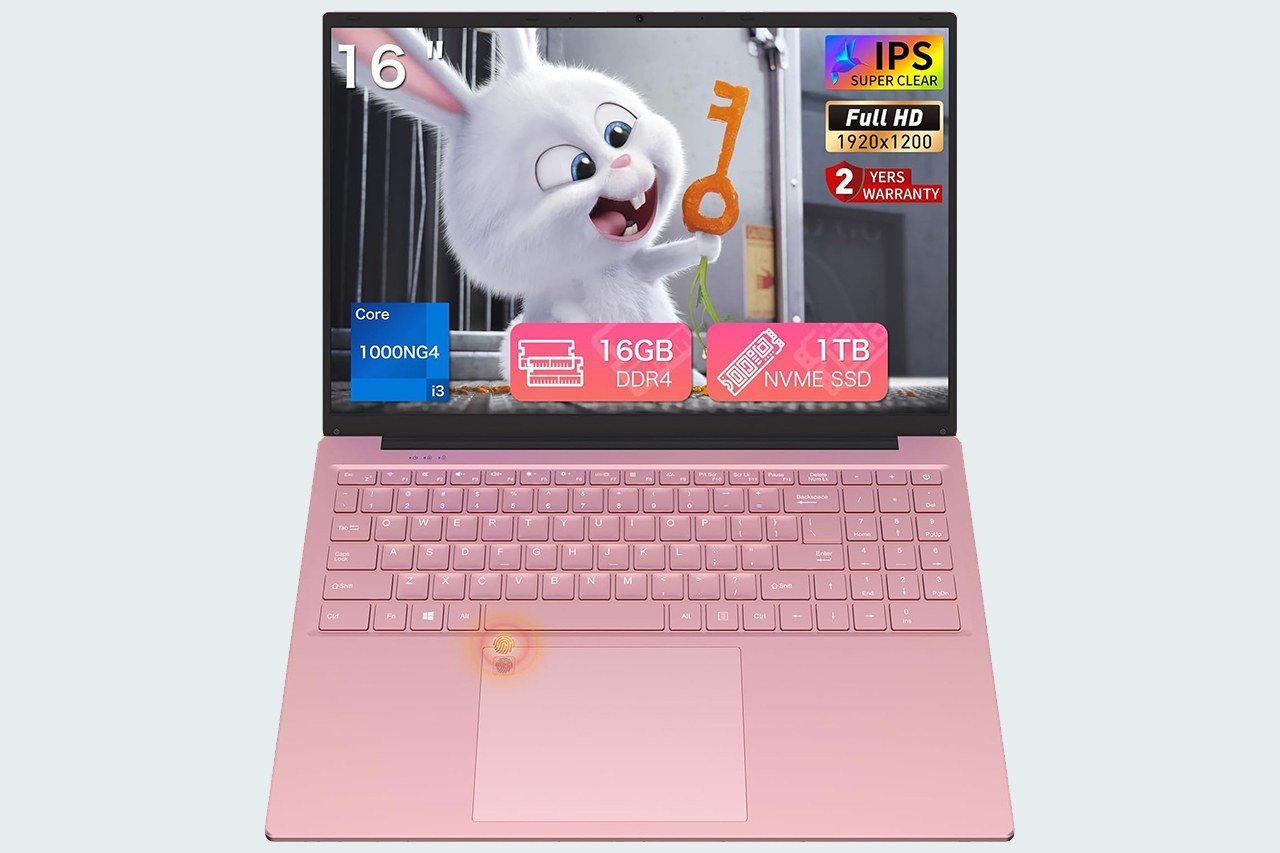
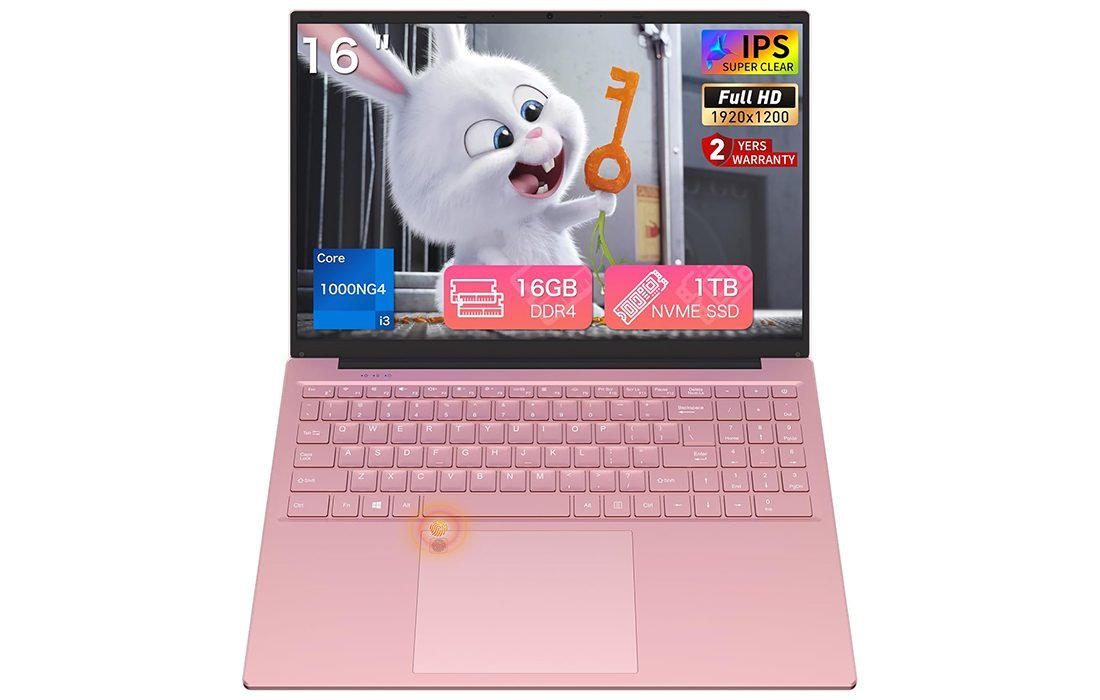
Auusda Laptop T161N — 16″ 16:10 IPS for Everyday Work
A large 1920×1200 IPS display, 16GB/1TB speed, and USB-C convenience make this pink Windows notebook a smart daily driver for study and office.
- 16″ 1920×1200 IPS (16:10) — extra vertical space for docs & sheets
- 16GB DDR4 + 1TB NVMe SSD — fast boot, smooth multitasking
- Wi-Fi 6, BT 5.3, full-function USB-C and Mini HDMI for easy I/O
- Backlit keyboard with numpad + fingerprint unlock (Windows Hello)
- Slim 1.7 kg chassis, 180° hinge; 2-Year warranty included
- CPU
- Core i3-1000NG4 (up to 3.2 GHz)
- Memory
- 16GB DDR4
- Storage
- 1TB NVMe SSD
- Display
- 16″ 1920×1200 IPS
- Wireless
- Wi-Fi 6 • BT 5.3
- Weight
- 1.7 kg
- Battery
- 5000 mAh
- OS
- Windows 11 Pro
If you’re hunting for a large-screen Windows notebook that doesn’t drain your wallet, the pink Auusda T161N is going to catch your eye first—and your curiosity next. It’s a 16-inch, 16:10 IPS machine that promises the “everyday sweet spot”: enough RAM and storage to keep life simple, the convenience of a backlit keyboard and fingerprint login, and modern radios like Wi-Fi 6 and Bluetooth 5.3. In short, it’s built to be easy to live with.
Over the last few days I used the T161N as a daily driver for writing, meetings, spreadsheets, and the usual stream of browser tabs. The experience is exactly what this category should be: quiet, friendly, and surprisingly capable once you pair a modest Intel Core i3-1000NG4 with 16GB of memory and a fast 1TB NVMe SSD. It’s not trying to be a gaming rig or a content-creation powerhouse; it aims to be a dependable companion for school, home, and travel.
Before we dive in, a quick note on the software: our unit arrived with Windows 11 Pro preinstalled. Some retail pages mention Windows 10 Pro; even if you encounter that variant, an update to Windows 11 is straightforward. The rest of the package—backlit keyboard, fingerprint reader in the touchpad, full-function USB-C, Mini HDMI, and a two-year warranty—rounds out the value story nicely.
Is Auusda T161N for you?
The T161N primarily solves a workflow problem: you need a bigger canvas than a typical 14- or 15.6-inch laptop for multitasking and reading, but you still want a machine that’s light enough to carry daily. The 16-inch 1920×1200 display gives you more vertical space for documents and spreadsheets; the 1.7 kg weight remains manageable for commuters and students.
It’s a smart fit for students, remote workers, content consumers, and casual creators. If your day looks like multiple Chrome/Edge windows, Office/Google Docs, Zoom or Teams, light photo adjustments, and the occasional Netflix session, this configuration is right in the pocket.
It’s not for heavy 4K video editing, modern AAA gaming, or code builds that chew through CPU cores. The Ice Lake i3 is a 2-core/4-thread part with Iris Plus G4 graphics; it’s quick enough for daily tasks but not designed for sustained pro workloads.
Budget-wise, this is a budget-to-lower-midrange notebook that leans on smart component choices (RAM + SSD + connectivity) rather than raw CPU muscle. It’s beginner friendly: Windows Hello fingerprint login, a backlit keyboard, and sensible port selection make setup painless.
What We Like About the Auusda T161N
The display is the star. A 16-inch 16:10 IPS panel at 1920×1200 looks noticeably roomier than 1080p 16:9, and the wide viewing angles help when you’re sharing your screen or leaning back to read. The listing claims 100% sRGB; regardless of the exact gamut, colors look lively, text is crisp, and the taller aspect ratio is easy to appreciate in docs and the browser.
Next, the user-experience upgrades matter more than spec sheet bragging: a backlit keyboard with a full numeric keypad, a large precision touchpad with an integrated fingerprint reader, and USB-C charging. Those are features you expect on pricier machines, and they change how pleasant a laptop feels every single day. The fingerprint reader has been reliable for instant unlocks—no more typing complex passwords in coffee shops.
Performance for the target audience is smooth and snappy. The i3-1000NG4 isn’t a fire-breather, but paired with 16GB DDR4 and a 1TB NVMe SSD, it launches apps quickly, keeps many browser tabs alive without swapping, and wakes from sleep instantly. Streaming, note-taking, light photo edits, and office work feel fluid. Thermals are conservative; the chassis stays comfortable and fan noise is unobtrusive.
The port selection fits modern life: full-function USB-C, Mini HDMI for external displays, two USB-A 3.0 plus one USB-A 2.0, 3.5mm headphone jack, and a dedicated DC barrel charging port. Combined with Wi-Fi 6 and Bluetooth 5.3, you have flexibility at a desk or on the go.
Finally, the overall design—ultra-slim, soft pink finish—presents well in classrooms and meetings. At 1.7 kg and 18.3 mm thick, it’s easy to carry. The 180-degree hinge is great for collaborative viewing, and the included keyboard cover is a welcome extra if you’re protective of that pastel aesthetic. The 2-year warranty and 90-day return policy add peace of mind that’s rare at this price.
What We Don’t Like About the Auusda T161N
The limitations are the ones you’d expect from a budget-leaning design. The CPU is a 10th-gen 2-core/4-thread part; it handles everyday work, but sustained heavy tasks will reveal its ceiling. If you routinely transcode video, compile large projects, or run complex Lightroom/Photoshop workflows all day, you’ll want more cores.
Iris Plus G4 is perfectly fine for UI smoothness, web animations, video playback, and light creative tasks, but it’s not made for AAA gaming. Indie and older titles at modest settings are okay; modern 3D games are not its wheelhouse.
The battery is rated at 5000 mAh. In practice, that’s a light-to-moderate workday with breaks rather than a dawn-to-dusk marathon. Streaming video and high brightness will shorten runtime quickly. If you’re traveling often, keep the compact charger in your bag (USB-C charging helps here).
The speakers are serviceable and the webcam is fine for calls, but neither stands out. The Mini HDMI port is more niche than full-size HDMI, so you’ll want the right cable or a small dongle in your kit. There’s no Thunderbolt, which is expected in this tier but worth noting if you rely on high-speed external drives.
Finally, while the chassis looks good, it’s mostly plastic and there’s a bit of deck and lid flex if you press hard—nothing alarming, just normal for the category. Documentation around whether USB-C carries video varies by listing; treat Mini HDMI as your primary display-out.
Pros & Cons
| Pros | Cons |
|---|---|
| 16-inch 16:10 IPS display (1920×1200) is roomy and easy on the eyes | 2-core/4-thread CPU limits heavy multitasking and pro workloads |
| 16GB RAM + 1TB NVMe SSD make daily use snappy | Integrated Iris Plus graphics not for modern AAA gaming |
| Backlit keyboard with numeric keypad | Battery is modest; frequent travelers will carry a charger |
| Fingerprint reader (Windows Hello) for quick, secure logins | Plastic chassis has some flex; speakers/webcam are average |
| Full-function USB-C, Mini HDMI, Wi-Fi 6, BT 5.3 | Mini HDMI requires the right cable; no Thunderbolt |
| Lightweight and slim; attractive pink finish | Brightness and color accuracy are good for the price but not pro-grade |
| 2-year warranty and 90-day return window |
What’s Included?
- Auusda T161N laptop (16-inch, pink)
- Charger (supports USB-C charging; DC barrel charger included)
- Keyboard cover
- Instruction manual
Overall, the unboxing experience is clean and pleasant. The gift-style presentation is a nice touch if you’re buying for a student or loved one, and the inclusion of a keyboard cover shows attention to real-world use (coffee, crumbs, backpack dust happen). I would have loved a simple USB-C to HDMI adapter in the box given the Mini HDMI choice, but that’s an easy, low-cost add-on.
Technical Specifications
| Component | Details |
|---|---|
| Processor | Intel Core i3-1000NG4 (10th Gen Ice Lake), 2 cores / 4 threads, up to 3.2 GHz turbo, 4 MB cache |
| Graphics | Intel Iris Plus Graphics G4, 48 EUs |
| Memory | 16GB DDR4 (sufficient for heavy browsing, office work, and light creative tasks) |
| Storage | 1TB NVMe SSD (fast boot and app launch, ample space) |
| Display | 16.0" IPS, 1920×1200 (16:10), wide viewing angles, “100% sRGB” claim |
| Wireless | Wi-Fi 6, Bluetooth 5.3 |
| Ports | Full-function USB-C, Mini HDMI, 2× USB-A 3.0, 1× USB-A 2.0, 3.5mm audio, DC charging |
| Security | Fingerprint reader (Windows Hello) on touchpad |
| Keyboard | Full-size backlit keyboard with numeric keypad |
| Battery | 5000 mAh (real-world: better for moderate days than marathon sessions) |
| Dimensions | 357.4 × 245.2 × 18.3 mm |
| Weight | 1.7 kg |
| Operating System | Windows 11 Pro on our unit (some listings note Windows 10 Pro) |
| Warranty | 2-Year Manufacturer Warranty, 90-day hassle-free return, gift packaging |
Features
- Large 16-inch Full HD IPS display (1920×1200) with a tall 16:10 aspect ratio for more lines of text and spreadsheet rows.
- Slim, lightweight pink design that stands out without being loud; 180-degree hinge helps with collaboration and viewing comfort.
- Intel Core i3-1000NG4 with Iris Plus G4 graphics: tuned for quiet, cool everyday productivity.
- 16GB DDR4 RAM and 1TB NVMe SSD for quick startup, fast app launch, and worry-free storage.
- Wi-Fi 6 and Bluetooth 5.3, keeping connections stable and power-efficient.
- Backlit keyboard with numpad for late-night work and data entry.
- Fingerprint reader integrated in the touchpad for easy Windows Hello login.
- Full-function USB-C, Mini HDMI, two USB-A 3.0, one USB-A 2.0, headphone jack, and DC charging.
- Gift-style packaging, a keyboard cover in the box, and a 2-year warranty with responsive support.
In practice, these features line up well. The taller 16:10 layout is the change you notice most—it’s simply better for reading and editing. The SSD + 16GB RAM combo eliminates the little frustrations that plague cheaper models with small memory footprints. The fingerprint reader is the sort of everyday luxury you get used to fast. The only one to treat cautiously is external-display output: since the system relies on Mini HDMI, plan on the proper cable or adapter for conference rooms and hotel TVs.
Real-World Experience
Setup & Everyday Flow. First boot is quick, and Windows Hello fingerprint registration takes seconds. I installed the usual work stack (Chrome/Edge profiles, Office/Docs, Slack/Teams/Zoom) and got to work. With 10–20 tabs, a couple of office apps, and Spotify/YouTube in the background, the system stayed responsive. Sleep/resume is instant; that’s the SSD + modern standby doing their thing.
Typing & Touchpad. The keyboard is spacious, with a numpad that’s handy for spreadsheets and budgeting. Key travel is middle-of-the-road with a soft landing—quiet enough for shared spaces. Backlighting helps in lecture halls and late flights. The touchpad glides well, and gestures register reliably. Having the fingerprint reader embedded in the pad doesn’t get in the way; it’s placed where you won’t hit it accidentally.
Display & Audio. The IPS panel offers the wide viewing angles you expect and looks clean for streaming. Indoors, brightness is fine; in direct sun you’ll want shade. Colors are lively for entertainment and casual edits. Speakers are clear enough for calls and YouTube but lack bass; headphones improve things immediately.
Connectivity & Ports. Wi-Fi 6 keeps 4K streams and file syncs smooth, and Bluetooth 5.3 held a steady connection to my earbuds. The port mix is genuinely useful: plug a USB-C power bank in a pinch, use Mini HDMI for a second screen at your desk, and still have USB-A ports free for accessories. I kept a compact Mini HDMI-to-HDMI cable in the sleeve; do the same if you present often.
Performance Boundaries. The i3-1000NG4 will open and export a short 1080p video, but large, complex timelines or RAW photo batches will test it. Light indie games run; modern 3D titles do not. The win is responsiveness in all the normal tasks: you feel the SSD and 16GB more than you miss extra CPU cores.
Thermals & Noise. The chassis stays cool to the touch, and fan noise is muted. Under sustained CPU load, you’ll hear a gentle whoosh rather than a whine. There’s no coil whine, and the palm rest never heats up distractingly.
Battery Life. With the brightness at a comfortable indoor level, Wi-Fi on, and a typical mix of browsing, docs, and music, you can get through long meetings and classes. Heavy streaming or high brightness shortens runtime sharply. The saving grace is USB-C charging—I used a compact 65W charger that I already carry for a phone/tablet and topped up quickly.
Build Quality & Design. The pink finish is tasteful and consistent, and the chassis lines are clean. There’s some flex in the lid and deck if you press deliberately; in normal use it’s a non-issue. Hinges move smoothly all the way to 180 degrees. The machine looks good set on a desk, which matters more than people admit.
Work Smarter on a Bigger Canvas
16″ 1920×1200 IPS, 16GB RAM + 1TB NVMe, USB-C & fingerprint—ready for study, office, and travel.
Who Should Buy the Auusda T161N?
- Students who want a modern, good-looking machine for note-taking, research, online classes, and entertainment—without sacrificing screen space or SSD capacity.
- Home/office users who value a quiet, dependable system with convenient logins, a backlit keyboard, and a roomy display for reading and spreadsheets.
- Travelers and remote workers who appreciate USB-C charging, practical weight, and a port mix that just works.
- Casual creators who do light Photoshop/Canva work, quick video trims, and social uploads—so long as expectations stay moderate.
If you need workstation-class horsepower, a calibrated wide-gamut panel, or gaming-grade graphics, this isn’t the right tool. But if you want an everyday laptop that feels thought-through and doesn’t nickel-and-dime you on RAM or storage, the T161N is a compelling pick.
Tips to Get the Most Out of It
- Keep a Mini HDMI cable in your bag—problem solved for conference rooms and hotel TVs.
- Use the keyboard cover when traveling to preserve the pink aesthetic; remove it when you want the best typing feel.
- Dial in Windows power settings to balance battery with performance, and let the display auto-adjust brightness to stretch runtime.
- Leverage Windows Hello; register multiple fingers so unlocks work at any angle.
- Upgrade your cloud backups (OneDrive/Google Drive) to take advantage of the 1TB local SSD without fear of data loss.
Alternatives to Consider
- A similar 15.6-inch budget model with the same RAM/SSD but a slightly smaller display if you value lower weight even more.
- An AMD Ryzen 5 or Intel Core i5 option around the next price tier for extra CPU cores if you compile, edit, or multitask heavily.
- A calibrated creator laptop if color-critical photo/video work is your day job; you’ll trade price and portability for accuracy and power.
The T161N’s advantage is how many everyday niceties it strings together in one package. Even compared with some machines that boast faster CPUs, it often feels better to use because it doesn’t choke on RAM or slow storage.
Final Breakdown
8.6 / 10
The Auusda T161N nails the “right features, right places” formula for an affordable large-screen Windows laptop. The 16-inch 16:10 display makes work genuinely easier, the 16GB/1TB pairing keeps it responsive long-term, and the quality-of-life extras—fingerprint login, backlit keyboard with numpad, USB-C charging—are the kind of details that make you like a laptop more each day.
Its limits are sensible and transparent: a 2-core CPU and integrated graphics mean it’s not built for heavy creative or gaming workloads, and the battery is sized for moderate days rather than red-eye flights. But if your priorities are a comfortable canvas, smooth everyday performance, modern connectivity, and a friendly design at a fair price, the T161N is easy to recommend.
Recommendation: For students, home users, and office workflows that live in the browser and Office/Docs, buy with confidence. Power users and gamers should step up to more cores and stronger graphics; everyone else will appreciate how balanced—and pleasant—this pink 16-inch laptop feels in daily life.
| Preview | Product | Price | |
|---|---|---|---|

|
Auusda 16" FHD Traditional Laptop Computers, i3 Processor, WiFi 6 Bluetooth 5.3, Laptops Notebook... | $419.99 $319.99 | View on Amazon |