

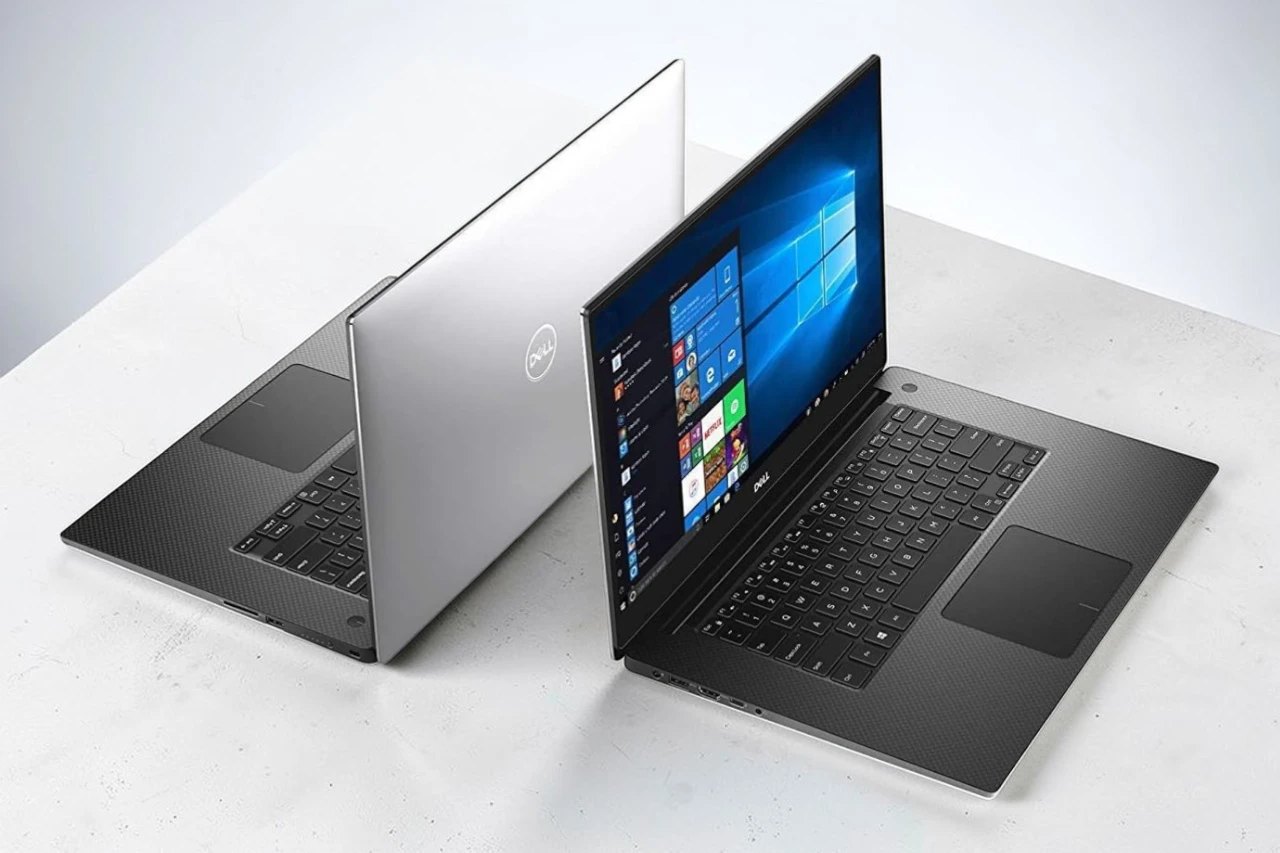
I spent the past few days working on the Dell XPS 15, and it left a strong but mixed impression. It feels solid in my hands, and the slim screen borders make the display stand out right away. This laptop aims to balance power and a premium design, and for the most part, it succeeds.
The 4K touch screen looks sharp and bright. Text appears crisp, and videos look detailed and colorful. I enjoyed editing photos and streaming content on it. The screen is one of its best features, though I did notice that some users have reported occasional display issues over time.
Performance feels fast in daily use. I opened many browser tabs, edited large files, and ran creative apps without slowdowns. The dedicated graphics card also handled light gaming well. Still, the laptop feels heavy, and I would not want to carry it all day. Battery life lasted a few hours in my testing, which is fine for short sessions but not ideal for long trips.
Build quality feels premium, and the keyboard is comfortable for long typing sessions. At the same time, this model costs more than many laptops with similar core parts, so the value depends on how much you care about the display and design.
Bottom Line
The Dell XPS 15 is a strong choice if you want a sharp 4K display and solid performance in a well-built laptop. It is not the lightest option, and long-term screen reliability may concern some buyers. If the display quality and power matter most to you, you can check the latest price and buy it here:
Overview of the Dell XPS 15 Laptop
After spending time with this 15-inch machine, I see why many people consider the XPS 15 a premium option. It feels solid in my hands, with a sturdy build and a slim design for its size. Still, I notice the weight when I carry it around the house.
The 4K touch screen stands out right away. Colors look rich, and text appears sharp. I enjoy editing photos and watching video on it, though the glossy display can reflect light in bright rooms.
Performance feels fast and steady. I run multiple apps, browse with many tabs open, and handle light gaming without slowdowns. The dedicated graphics help with creative work.
I also like:
- Fast SSD storage
- Smooth multitasking
- Comfortable backlit keyboard
Battery life feels average, and I have seen reports of screen and video issues from some users. My unit runs well, but it is not perfect.
Immersive 4K InfinityEdge Touch Display
The screen grabbed my attention right away. Colors look rich and sharp, and text appears crisp even when I scale it down to fit more on the screen. Photos and 4K videos show fine detail without looking washed out.
The slim bezels make the display feel larger than it is. I noticed the near edge-to-edge design helps when I edit photos or watch movies. The anti-glare finish cuts reflections, which helps in bright rooms.
Touch input feels smooth and accurate. I tapped, scrolled, and zoomed without delay.
What stood out to me:
- Clear, detailed image quality
- Strong brightness for indoor use
- Wide viewing angles
I did notice occasional screen flicker during long use, which some users have also reported. It did not happen often, but it is worth noting.
Powerful 9th Gen Intel Core i7 Performance
From the first boot, the XPS 15 felt fast and steady. Apps opened without delay, and the system stayed smooth while I worked in several programs at once.
The 9th Gen i7 handled heavy tasks with ease. I edited large photos, streamed video, and kept many browser tabs open, and it did not slow down. The six-core chip gave me strong multitasking power for daily work and creative projects.
When I pushed it with light video edits and large file transfers, it kept up well. The fans did spin up under load, and I felt some heat near the keyboard, but performance stayed consistent.
What I noticed most:
- Quick startup and app launches
- Smooth multitasking
- Stable speed during longer workloads
For demanding tasks, the processor delivers solid, reliable performance.
NVIDIA GeForce GTX 1650 Graphics
I pushed the system with games, photo edits, and some light video work to see how the GTX 1650 would hold up. It handled everyday creative tasks with ease and kept frame rates steady in many popular titles at medium settings.
The dedicated 4GB GDDR5 memory gives it a clear edge over basic integrated graphics. I noticed smoother gameplay and faster render times compared to entry-level GPUs.
What I liked:
- Solid performance for casual gaming
- Smooth playback of 4K video
- Stable performance during long sessions
What could be better:
- Struggles with newer AAA games on high settings
- Not ideal for heavy 3D rendering or advanced effects
For most users who want balanced graphics power without moving to a high-end gaming laptop, the GTX 1650 feels practical and dependable.
Ultra-Fast 1TB PCIe SSD Storage
Opening large files felt quick and smooth. The 1TB SSD in the XPS 15 gave me fast boot times and near‑instant app launches during daily use.
I moved multi‑gigabyte video clips and photo libraries without long waits. Projects loaded fast in editing software, and the system stayed responsive while I worked on several tasks at once.
What I liked:
- Fast startup and shutdown
- Quick file transfers
- Plenty of space for large media files
What could be better:
- Heavy media users may still need external storage over time
The 1TB capacity gave me room for games, work files, and creative projects without juggling space. For most people, it strikes a solid balance between speed and storage size.
Memory and Multitasking Capabilities
Right away, I noticed how smoothly it handled heavy workloads. I kept dozens of browser tabs open, streamed video, and edited large photos without slowdowns.
The 16GB of RAM gives the XPS 15 plenty of room to breathe. Apps stay open in the background, and switching between them feels quick and steady. I rarely saw lag, even when I pushed it with creative software and office tasks at the same time.
The 1TB SSD also helps.
- Programs launch fast
- Files open without delay
- System startup feels quick
That said, when I stacked very demanding tasks like gaming and video editing together, I could feel some strain. It did not freeze, but performance dipped slightly.
For daily multitasking and most professional work, it feels reliable and responsive.
Portability and Build Quality
After carrying it around for a few days, I noticed the weight right away. At about 5.5 pounds, the XPS 15 feels solid, but not light. I can move it around the house with ease, yet I would not want it in my backpack all day.
The chassis feels strong and well put together. The lid opens smoothly, and the keyboard deck stays firm when I type. Nothing creaks or flexes during normal use.
I like the slim screen borders. They keep the footprint smaller than many other 15-inch laptops.
Still, this is not an ultra-thin travel machine. It works best as a desktop replacement you can relocate, not a daily commuter laptop.
Battery Life Experience
After a full day of mixed work, I paid close attention to how long it stayed off the charger. In daily use, the XPS 15 lasted through several hours of browsing, writing, and streaming without stress.
When I pushed it harder with photo edits and light gaming, the battery drained much faster. I needed the charger nearby for heavier tasks.
What I noticed most:
- Solid runtime for basic work
- Shorter life under heavy graphics use
- Fast drain with high screen brightness
The 4K touch display looks great, but it clearly uses more power. I often lowered brightness to stretch usage.
For a powerful laptop, the battery life feels reasonable, but it does not feel long‑lasting during demanding work. I plan my day around that.
Pros & Cons
After spending time with this XPS 15, I see clear strengths and a few limits that matter in daily use.
Pros:
- Sharp 4K touch display – The screen looks crisp and bright. Text is clear, and photos and videos look detailed. I enjoyed using it for editing and streaming.
- Strong overall performance – The i7 processor and 16GB of RAM handled my heavy apps with no lag. I ran multiple programs at once without slowdowns.
- Fast storage – The 1TB SSD boots quickly and opens files fast. I noticed short load times when moving large files.
- Capable graphics – The GTX 1650 handled light gaming and creative work well. It managed modern titles at reasonable settings.
- Solid build quality – The chassis feels sturdy. The keyboard has a nice backlight, and the fingerprint reader worked reliably for quick sign‑ins.
- Good port selection – I used the Thunderbolt port and SD card reader often. They made it easier to connect drives and cameras.
Cons:
- Screen flicker reports – I did not see constant issues, but some users mention occasional flickering. That could be a concern over time.
- Weight and size – It feels heavy for a laptop. I found it better for desk or home use than daily travel.
- Premium price – It costs more than some laptops with similar core specs. You pay extra for the display and design.
- Mixed long‑term reliability feedback – A few users report video-related problems after extended use. That may affect confidence for long ownership.
Overall, I found the XPS 15 powerful and well built, but it works best as a desktop replacement rather than a lightweight travel machine.
Customer Reviews
After spending time with it, I understand why opinions feel split. Many users praise the sharp 4K display and strong performance. I also noticed how smooth it runs during heavy tasks and even gaming.
Several buyers feel it offers solid power for the price, especially with the fast processor and upgrade options. The screen stands out the most. Colors look clear, and the touch feature responds well.
Still, not all feedback is positive. A few users report screen flickering over time. Others mention video issues or say it feels heavy for travel.
Common themes I’ve seen:
- Excellent display quality
- Strong performance for demanding work
- Heavier than expected
- Occasional screen or video concerns
Overall, reviews show satisfaction with performance and display, but long-term reliability and portability raise concerns for some owners.
Conclusion
After spending real time with this machine, I see why the XPS 15 still has a strong following. It feels solid, runs fast, and handles heavy tasks without slowing down. The screen stands out the most. It looks sharp, bright, and detailed, especially when I stream video or edit photos.
That said, it is not perfect. I noticed a few downsides that matter depending on how you plan to use it.
What I liked:
- Strong performance for work and light gaming
- Sharp 4K touch display
- Solid build quality
- Easy multitasking
What could be better:
- Heavier than many 15-inch laptops
- Some users report screen issues over time
- High price
Overall, I think the XPS 15 fits best for people who want power and a premium screen in one device, and who do not mind the extra weight.
| Preview | Product | Price | |
|---|---|---|---|

|
Dell XPS 15 laptop 15.6″, 4K UHD InfinityEdge Touch, 9th Gen Intel Core i7-9750H, NVIDIA GeForce GTX… | $1,341.62 | View on Amazon |




