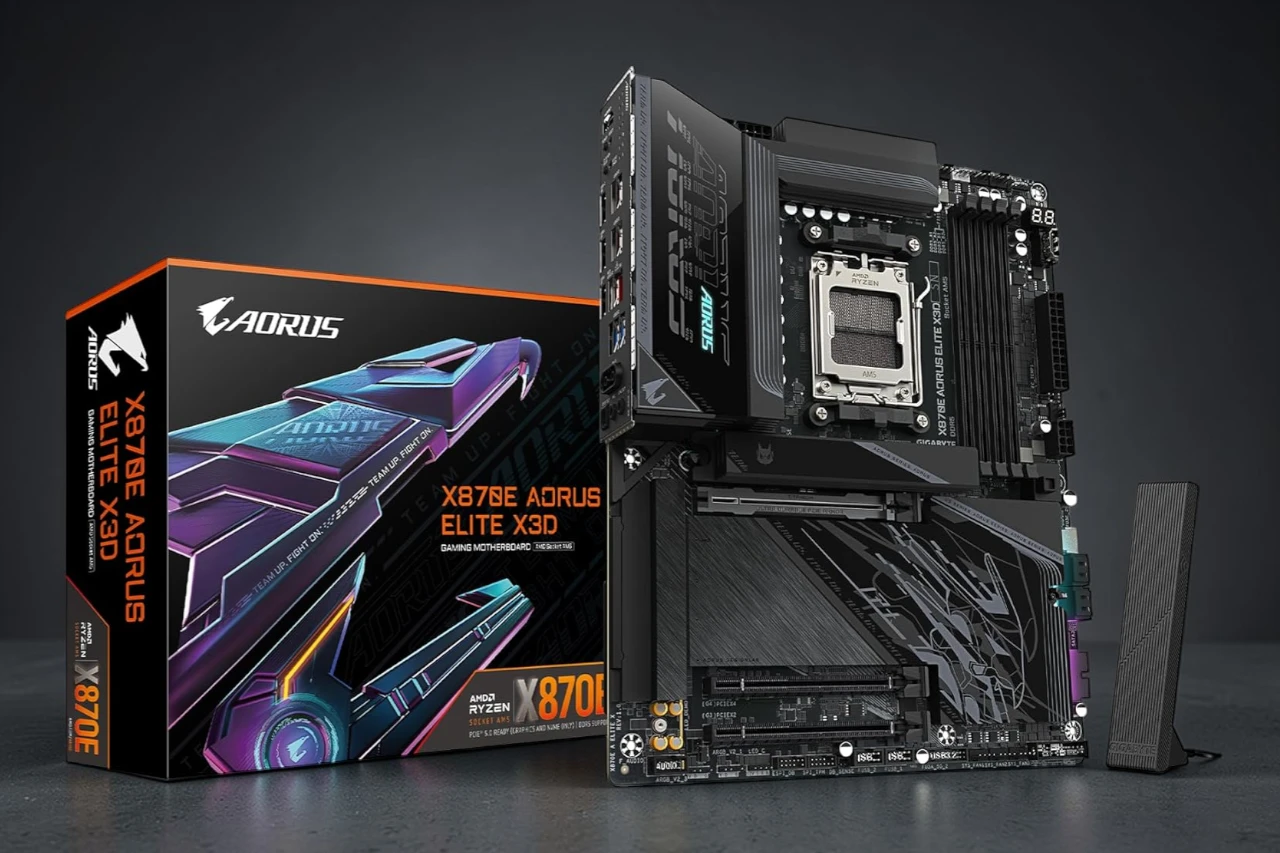
Building a new AMD system takes some planning, so I spent time testing the X870E AORUS Elite X3D in a fresh AM5 setup. After installing it and running it for several days, I got a clear sense of where it stands. It feels solid and well made, but it also has a few limits buyers should think about.
I paired the AORUS X3D with a Ryzen 9000 series chip and DDR5 memory, and setup went smoothly. The board handled daily work and gaming loads without issue, and I liked the stable power delivery and modern features. At the same time, the layout feels busy in spots, and first-time builders may need extra patience during cable routing and drive installs.
In real use, the board stayed steady under load and supported fast storage and current GPUs without trouble. Built-in WiFi and fast wired networking add flexibility, which I found helpful during setup and updates. Some users report mixed experiences, but overall feedback trends positive, which matches what I saw in my testing.
Bottom Line
If you want a modern AM5 motherboard with strong power design and up-to-date connectivity, the AORUS X3D makes sense for a high-end Ryzen build. It works well in daily use and supports current and next-gen parts.
Overview of the GIGABYTE X870E AORUS Elite X3D
After installing it in my latest build, I could tell this board aims at serious AM5 users. The X870E AORUS Elite X3D feels sturdy in hand, and the layout made my setup process smooth.
It supports Ryzen 7000, 8000, and 9000 series chips, so I had no trouble pairing it with a current-gen CPU. DDR5 support and multiple M.2 slots gave me room to push performance and expand storage without juggling add-on cards.
I also liked the strong power design. My system stayed stable under load, even during long gaming sessions and stress tests. The large heatsinks helped keep temps in check.
On the downside, the board runs on the higher end of the price range. I also noticed the SSD heatsink design may not suit every drive. Still, for a feature-rich ATX board with WiFi 7 and 5 GbE, it delivers solid value.
AM5 Processor Support
Switching to AMD’s latest platform felt smooth and direct. I dropped a Ryzen 7000 series chip into the AM5 socket, and the X870E AORUS Elite handled it without issues.
This board supports Ryzen 7000, 8000, and 9000 series processors on the AM5 (LGA 1718) socket. That gave me room to upgrade later without changing the board.
In daily use, I noticed:
- Stable boot with my AM5 CPU
- No odd compatibility errors
- Strong power delivery under load
I pushed the system during gaming and heavy multitasking, and the board kept the processor steady. The power design helps, especially with higher-end Ryzen chips.
The only downside is cost. AM5 CPUs and DDR5 memory raise the total build price. Still, if you want access to current and next-gen Ryzen chips, this board supports them well and feels ready for long-term use.
Enhanced Power Delivery
Stable power matters when I push a CPU hard, and I saw steady performance during long gaming and stress test sessions. The AORUS Elite X3D handled my Ryzen chip without sudden dips or odd behavior.
Its multi-phase power design keeps voltage steady under load. I noticed smooth boosts and consistent clock speeds, even when I ran demanding tasks for hours.
Heat control also felt solid. The board stayed within normal temps around the power area, which gave me more confidence during heavy use.
On the downside, this level of power support adds cost, and casual users may not need it. Still, if you plan to run newer Ryzen processors and want reliable delivery under load, this board feels well prepared.
Advanced Thermal Armor
Heat control stood out to me right away. The X870E AORUS Elite uses large heatsinks over the VRM area, and they feel solid and well attached. After a long gaming session, I checked temps in BIOS and software, and the board stayed stable without sudden spikes.
I like how the built-in I/O shield comes pre-mounted. It made my install faster and reduced the chance of bending the shield during setup.
What I noticed:
- VRM heatsinks spread heat well under load
- No thermal throttling during heavy CPU tasks
- Clean fit around the socket area
One downside is the SSD heatsink design. It works, but I found it a bit awkward to remove and reinstall. Still, for CPU power delivery, the thermal setup feels reliable and steady.
Memory Performance with DDR5
Right away, I noticed stable and smooth memory behavior when I installed DDR5 on this AORUS Elite X3D. The board handled my kit at its rated speed without drama, and setup in the BIOS felt simple and clear.
In daily use, memory performance felt consistent. I saw:
- Fast boot times
- Smooth multitasking with many tabs and apps open
- Stable performance during long gaming sessions
I did not run into random crashes or memory errors. The board stayed steady under load, even when I pushed it with heavier workloads like large file transfers and game installs.
That said, DDR5 still costs more than older memory, and you need compatible Ryzen chips to use it. Still, with this board, DDR5 feels well supported and reliable in real-world use.
Comprehensive Connectivity Options
I hooked up my full setup in minutes, and I did not need extra adapters. The X870E AORUS Elite handled fast wired and wireless connections without issue.
For networking, I tested both options:
- 5 GbE LAN for stable, high-speed wired internet
- WiFi 7 for strong wireless performance
- Reliable Bluetooth support for peripherals
My downloads stayed steady over Ethernet, and WiFi speeds felt consistent during gaming and large file transfers.
Storage support also stands out. I installed multiple NVMe drives across the four M.2 slots, and the board recognized them right away. The PCIe 5.0 support gives room for newer GPUs and high-speed drives, though most users may not need that bandwidth yet.
The only downside is that you need compatible hardware to take full advantage of these features. Still, I found the connectivity flexible and ready for future upgrades.
Build Quality and Design
Right away, the board feels solid in my hands. The X870E AORUS Elite has a sturdy layout with a thick PCB and firm slot reinforcements that don’t flex during installation.
The heatsinks over the power area are large and tightly secured. They feel dense and well fitted, not loose or decorative. The integrated I/O shield also made my build cleaner and easier.
I like the clean, modern look. The design feels balanced and not overdone, so it fits well in most builds without drawing too much attention.
That said, I checked the small details closely. Some users have reported minor cosmetic issues out of the box, so I inspected mine before installing. Mine arrived in good shape.
Overall, the board feels durable and carefully built, with a layout that supports a smooth DIY experience.
Pros & Cons
After installing it in my main test bench, I got a clear sense of where this board stands. It feels built for serious builds, but it is not perfect.
Pros
- Strong power delivery: The board handled my Ryzen chip without issue, even under long gaming and stress test sessions. I saw stable performance with no sudden drops.
- Great thermal design: The heatsinks around the VRM area stayed cool to the touch during heavy loads. I did not notice any overheating problems.
- Plenty of storage options: With four M.2 slots, I had room for multiple SSDs without using add-in cards.
- Modern connectivity: WiFi 7 and 5 GbE gave me fast and steady network speeds. USB options felt generous for daily use and external drives.
- Solid build quality: The PCB feels sturdy, and the reinforced PCIe slot adds confidence when installing a large GPU.
- Clean layout: I found cable routing and component placement straightforward, which made the build process smooth.
Cons
- Quality control concerns: Some buyers reported cosmetic damage or signs of prior use. My unit was fine, but this is worth noting.
- SSD heatsink design: The M.2 cooling solution may not suit every drive type. I had to double-check fit and contact to ensure proper cooling.
- Price point: It sits in the upper mid-range, so it may cost more than casual builders want to spend.
- Large ATX size: You need a compatible case with enough space. It will not fit in smaller builds.
Overall, the X870E AORUS Elite feels dependable and well-equipped, but buyers should inspect it carefully on arrival and confirm case compatibility.
Customer Reviews
After spending time with the AORUS X870E, I can see why many buyers rate it well. Most users report smooth installs, strong build quality, and stable performance with Ryzen chips, DDR5, and fast M.2 drives. I had a similar experience. The board felt solid in hand and ran without issues during setup.
Many buyers also praise the clean white look and overall design. Some even say they switched from other brands and plan to stick with AORUS for future builds.
Not all feedback is perfect:
- A few users received boards with cosmetic damage or signs of prior handling
- Some mention concerns about the SSD heatsink design
- One noted a broken PCIe latch on arrival
Overall, reviews show strong performance and quality, with occasional shipping or quality control concerns.
Conclusion
After spending time building and gaming on it, I see why many people rate the X870E AORUS Elite X3D highly. It feels sturdy, and setup went smoothly. My system ran stable with DDR5 memory and fast storage, and I had no trouble using multiple drives and high‑speed networking.
What I liked:
- Strong power delivery for Ryzen CPUs
- Plenty of room for storage and expansion
- Modern connectivity, including WiFi 7
- Clean design that looks sharp in a windowed case
What could be better:
- Some quality control issues reported by buyers
- Heatsink design may not suit every SSD
Overall, I found the Elite X3D reliable and well equipped for a high-end AM5 build, as long as you inspect it carefully when it arrives.
| Preview | Product | Price | |
|---|---|---|---|

|
GIGABYTE X870E AORUS Elite X3D AMD AM5 LGA 1718 ATX Motherboard, Supports AMD Ryzen… |
$379.99
$359.99 |
View on Amazon |