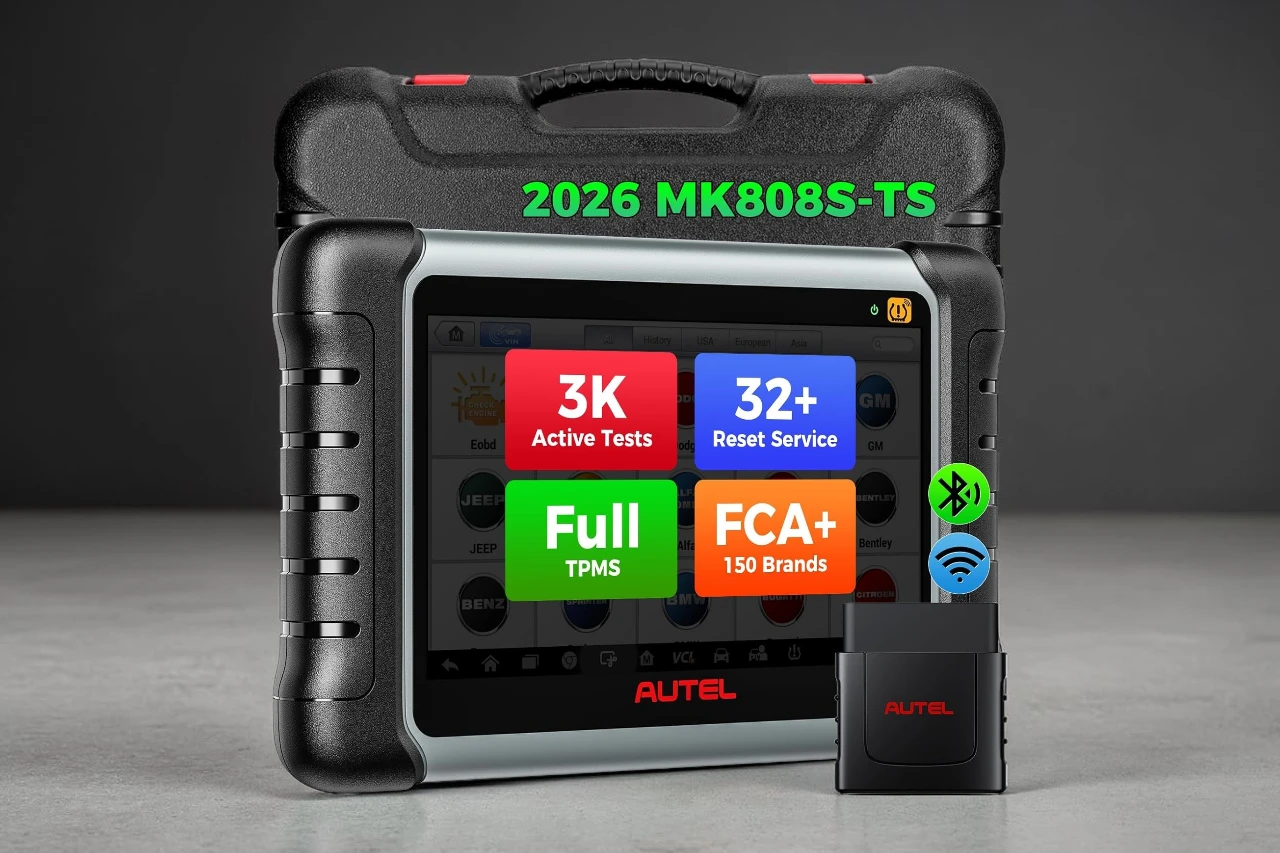
If I were giving a short verdict up front, I’d say the Autel MaxiCOM MK808S-TS OBD2 Scanner makes the most sense for serious DIYers, mobile mechanics, and small shops that want bidirectional testing plus strong TPMS capability in one tablet-style tool. I would skip it if I only needed to clear basic check engine codes or read generic OBD2 data. Its main strength is the mix of active tests, full-system access, and TPMS functions. Its biggest trade-off is simple, vehicle support still depends on make, model, and year, so buyers need to verify coverage before assuming every function will work on their car.
The real buying decision comes down to this: if I need TPMS work and deeper diagnostics on supported vehicles, this tool offers much more practical value than a basic code reader, but it is too much tool for casual users.
This is a 7-inch Android-based scan tablet aimed at people who do more than code checks. Before buying, I’d look closely at vehicle compatibility, gateway access requirements for newer FCA and Renault models, update expectations, and whether I’ll actually use TPMS programming and bidirectional controls. Those are the features that justify stepping up to a tool in this class.
Bottom Line
If I want one scan tool that covers full-system diagnostics, service resets, active tests, and TPMS jobs in a single package, the Autel MaxiCOM MK808S-TS OBD2 Scanner is a strong fit for the right vehicles.
Autel MaxiCOM MK808S-TS OBD2 Scanner At A Glance
Who This Tool Fits Best
From my perspective, this is not a beginner’s “glovebox scanner.” It fits people who work on multiple vehicles, diagnose more than engine faults, and want service functions without moving into a much more expensive shop tablet.
I see the best fit as:
- Advanced DIY owners with several cars
- Independent techs and small garages
- Tire and repair shops that also handle TPMS jobs
- Used car buyers or resellers who need deeper system checks
It is less suitable for someone who only wants to read emissions codes once in a while.
What Stands Out Right Away
What grabbed my attention first was the feature mix. This unit combines all-system scanning, active tests, and TPMS functions, which often means buying separate tools.
It also uses a newer Android 11 platform with more memory than older entry-level scan tablets. In practice, that matters because lag and slow menu loading are common complaints on cheaper diagnostic tools.
Bi-Directional Control for Real Diagnostic Work
Active Tests for Components and Actuators
What makes this class of tool useful is the ability to command certain components instead of just reading fault codes. I use that kind of function to narrow down whether I’m dealing with a bad part, wiring issue, or control problem.
The listing claims thousands of active tests, including common functions like:
- Windows
- Wipers
- Mirrors
- Sunroof-related systems
- Other supported actuators by vehicle
That said, I would not assume every test is available on every car. Active test support varies a lot by platform.
Why This Matters Beyond Basic Code Reading
A cheap reader tells me a code exists. A bidirectional tool can help me check whether a system responds when commanded. That saves time.
For real diagnostic work, this matters a lot. If I am tracing an HVAC flap motor issue, fuel pump control problem, or body electronics fault, active tests can be the difference between guessing and proving a fault path.
TPMS Coverage That Adds Real Shop Value
Programming, Relearn, and Retrofit Support
One reason this model stands out is the built-in TPMS focus. If I regularly swap wheels, replace sensors, or work on late-model vehicles with tire pressure faults, this is a meaningful upgrade over a standard service scanner.
The listed TPMS abilities include:
- Sensor programming support
- Relearn functions
- Retrofit support
- TPMS diagnostics as part of system scanning
That combination is useful for tire service work and for owners who want one tool instead of separate scan and TPMS devices.
Where TPMS Capability Makes This Model Different
A lot of mid-range scanners handle resets and code work well enough. Fewer combine that with dedicated TPMS functions in a single unit.
That is where I see real value here. If I never touch TPMS work, I would question whether I need this version. If I do TPMS work even a few times a year, this model makes a stronger case.
All-System Diagnostics and Service Functions
Full-System Scanning Across Major Modules
For day-to-day repair use, full-system access is much more valuable than generic OBD2 alone. I want to see what the ABS, SRS, transmission, body, battery, and other control units are reporting, not just engine codes.
This tool is positioned for complete system scanning across a wide range of brands and years. That broad reach is useful if I maintain mixed vehicles at home or in a small shop.
What is not fully specified is exact module depth by vehicle. That matters, because one car may offer rich access while another may be more limited.
Reset and Maintenance Functions for Routine Jobs
The long list of service functions is a big part of the appeal. Common maintenance jobs mentioned include:
- Oil reset
- Electronic parking brake service
- Battery registration
- Brake bleeding support
- Steering angle related functions
- TPMS service functions
For routine repair work, that covers a lot of ground. I still recommend checking whether the exact reset or adaptation I need is supported for my specific vehicle.
Hardware, Speed, and Day-to-Day Usability
Android 11, 4GB RAM, and 5G Wi-Fi Performance
In actual use, hardware matters more than spec sheets suggest. A scanner that stalls, freezes, or takes too long to boot gets annoying fast.
This one uses Android 11 with 4GB RAM and 64GB storage, plus 5G Wi-Fi support. Compared with older low-memory scanners, that should help with smoother navigation, quicker updates, and less waiting between menus.
I also like that it is a self-contained tablet design. That is easier to carry around a vehicle than dragging around a laptop-based setup.
Screen Size, Portability, and Workshop Handling
The 7-inch screen is a practical middle ground. It is large enough for graphs and menus, while still compact enough to hold in one hand for short periods.
At a little over five pounds, it is not ultra-light. I would call it portable, not pocketable. For bench work, tire bay use, and general workshop handling, the size looks reasonable.
Compatibility, Support, and Buying Considerations
Vehicle Coverage and Gateway Access Notes
This is the area I would check most carefully before purchase. The listing says coverage spans many brands and model years, including support notes for newer FCA vehicles through AutoAuth and gateway access for Renault.
That is useful, especially since security gateways can block diagnostic work on newer vehicles. Still, exact function support by vehicle is not fully specified in the product data.
Before buying, I would verify:
- Exact make, model, and year coverage
- TPMS function support for my vehicle
- Active test availability for my platform
- Service reset support for the exact systems I need
Warranty, Updates, and Ownership Expectations
The listed warranty is one year for quality issues. That is decent, though not unusually long for this kind of equipment.
What I would want buyers to remember is that ownership cost is not just the device itself. With advanced scan tablets, update policies and long-term software support matter. The product data here does not clearly spell out extended update terms, so I would check the listing details before committing.
Pros & Cons
Pros:
- Combines bidirectional controls, all-system scanning, and TPMS functions in one tool
- Better fit than a basic code reader for serious DIY and shop use
- Newer Android 11 hardware should feel faster than older entry-level tablets
- Useful service reset coverage for common maintenance jobs
- FCA AutoAuth and Renault gateway notes add practical compatibility value
- 7-inch format looks easy to use around the vehicle
Cons:
- Too expensive and too complex for someone who only needs basic OBD2 code reading
- Function support varies by vehicle, and exact fitment depth is not fully specified
- TPMS-focused value drops a lot if I do not work on sensor programming or relearns
- Weight is reasonable for a tablet scanner, though not especially light for all-day handheld use
Customer Reviews
From the buyer feedback trend, the response looks generally positive. Most people seem to buy it for the same reasons I would consider it, deeper diagnostics than a basic scanner and the added TPMS capability.
The pattern I usually watch for with tools like this is whether complaints center on hardware quality or vehicle compatibility. Here, the main caution appears to be the normal one for scan tools, feature availability can differ based on the vehicle. That matches my own view. A strong scanner can still disappoint if someone assumes universal support without checking first.
The product appears well regarded by many buyers, which adds confidence, though I would still base the decision on feature fit rather than ratings alone.
Conclusion
After looking at what it offers, I think the Autel MaxiCOM MK808S-TS OBD2 Scanner is a practical step up for people who need more than code reading. Its strongest case is for users who want active tests, broad system access, service resets, and real TPMS capability in one device.
I would recommend it most to advanced DIY owners, mobile technicians, and smaller repair shops working across different vehicles. I would skip it for casual drivers who only need to clear a check engine light once in a while. My final verdict is simple: the Autel MaxiCOM MK808S-TS OBD2 Scanner is a good fit when I can verify support for my exact vehicle and I know I will use its deeper functions often enough to justify the cost.
| Preview | Product | Price | |
|---|---|---|---|

| Autel MaxiCOM MK808S-TS OBD2 Scanner: 2026 Same TPMS Tool as MX808S-TS MP900-TS MS906 Pro w… | $699.00 $649.00 | View on Amazon |