

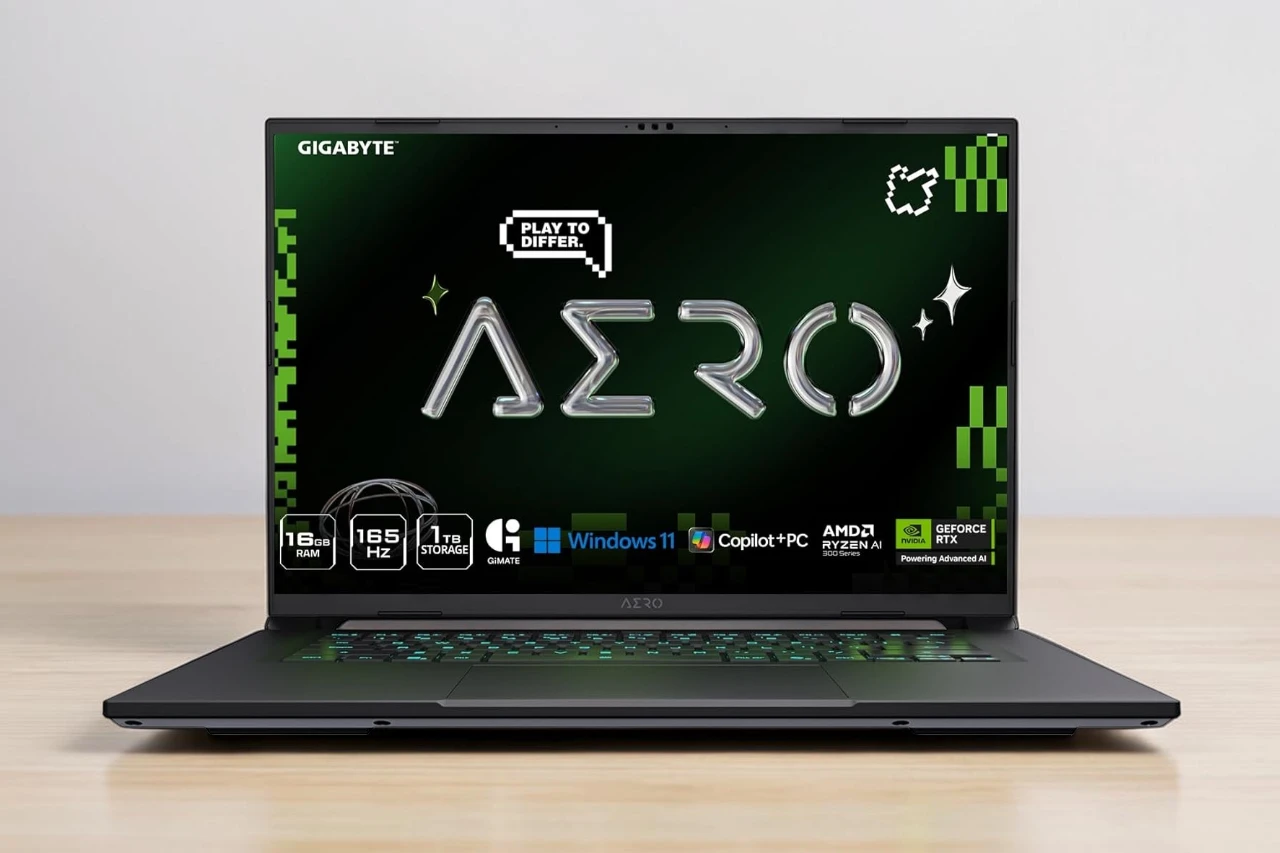
The GIGABYTE AERO X16 is a 16-inch laptop built for users who need both solid gaming performance and creative capability in a thin, portable package. It pairs an AMD Ryzen AI 7 350 processor with an NVIDIA GeForce RTX 5060 Laptop GPU, targeting gamers, content creators, and professionals who want one machine that handles everything.
The biggest question a buyer should ask before purchasing: does the RTX 5060 and Ryzen AI 7 350 combination deliver enough power for your specific workload, and can the battery keep up when you’re away from an outlet? Those two factors define whether this laptop is the right fit or a frustrating compromise.
The AERO X16 stands out for its sharp 2560×1600 display, thin 16.75mm chassis, and competitive pricing for the hardware it includes. The main compromises are battery life that falls well short of the advertised figure under real-world conditions and a GPU tier that sits below the top end of the RTX 50 series.
It fits neatly in the mid-to-upper segment of the creator and gaming laptop market, competing with machines that often cost significantly more for similar specs.
Bottom Line
The AERO X16 is a well-rounded option for gamers and creators who prioritize display quality, portability, and value. It is not the ideal pick for anyone who needs all-day untethered battery life.
GIGABYTE AERO X16 Overview
The AERO X16 is designed to be a dual-purpose machine. It handles creative tasks like photo editing, video work, and 3D rendering alongside gaming without requiring two separate devices.
At 1.9 kilograms and 16.75mm thick, it is notably slim for a laptop carrying dedicated graphics. The Space Gray chassis feels premium and well-built based on user feedback, with no major reports of flex or poor construction quality.
The display runs at 165Hz with a 2560×1600 resolution, which is a meaningful step above standard 1080p screens. That resolution and refresh rate combination serves both gaming smoothness and content creation accuracy.
Who This Laptop Is Best For
This laptop suits a specific type of buyer rather than everyone.
- Content creators who need color-accurate work and GPU-accelerated rendering
- Gamers who want solid 1440p-level gaming performance without carrying a heavy machine
- Students and professionals who move between locations and need a capable machine daily
- Anyone prioritizing value in the RTX 50 series laptop generation
It is less suited to buyers who need maximum GPU performance for triple-A games at ultra settings or professionals who require full-day battery life away from a charger.
RTX 5060 Graphics Performance
The RTX 5060 Laptop GPU is built on NVIDIA’s Blackwell architecture and includes 8GB of GDDR7 memory. It supports DLSS 4, which uses AI to boost frame rates by rendering at a lower resolution and upscaling, often with strong results in supported games.
What To Expect In Modern Games
At the laptop’s native 2560×1600 resolution, the RTX 5060 handles many modern titles at high settings comfortably. One verified buyer reported around 45 frames per second in Fortnite at maximum settings with ray tracing enabled, which is a demanding scenario.
Another user noted approximately 100 frames per second in STALKER 2 at 1440p resolution. With DLSS 4 enabled in supported titles, frame rates improve further.
The RTX 5060 is a mid-range GPU at the laptop level. It is not the right choice for buyers who want to max out the most demanding games at the highest settings without compromise.
Why It Matters For Creative Apps
The 8GB of GDDR7 VRAM supports GPU-accelerated workflows in applications like DaVinci Resolve, Adobe Premiere Pro, and Blender. GDDR7 memory has higher bandwidth than previous generations, which benefits video encoding and 3D rendering tasks.
NVIDIA Studio drivers are available for this GPU, which optimizes performance in creative software. For users doing photo editing, color grading, or moderate 3D work, the RTX 5060 provides meaningful acceleration.
Ryzen AI 7 350 Speed And Responsiveness
The AMD Ryzen AI 7 350 is an 8-core processor with a maximum boost speed of 5GHz. It belongs to AMD’s Ryzen AI series, which includes a dedicated Neural Processing Unit for AI-accelerated tasks.
The processor comes paired with 16GB of DDR5 RAM running at 5600MHz in a dual-channel configuration. The memory slots support up to 64GB total, which is useful for users who need more RAM down the line.
Everyday Multitasking And Productivity
In everyday use, the Ryzen AI 7 350 handles browser tabs, productivity software, video calls, and light content work without slowdown. Multiple buyers described it as fast and dependable for work and school tasks.
The 1TB PCIe Gen 4 NVMe SSD contributes to a responsive experience. Boot times are quick, and file transfers move at high speeds compared to older SSD standards.
GiMATE And Copilot+ Experience
GIGABYTE includes its GiMATE AI assistant, which is designed to adapt system settings based on workload. It can shift between performance modes to balance power draw and speed depending on what the user is doing.
As a Copilot+ PC, the AERO X16 meets Microsoft’s requirements for on-device AI features in Windows 11 Home. These features include tools like Recall and enhanced voice recognition, though the practical benefit varies by workflow. GiMATE adds a layer of automation on top, but some users may find the software adds complexity without obvious gains.
16-Inch 165Hz WQXGA Display
The screen is one of the strongest parts of the AERO X16. It uses an IPS panel at 2560×1600 resolution with a 16:10 aspect ratio.
Sharpness Color And Motion Clarity
The 2560×1600 resolution on a 16-inch screen produces a pixel density that makes text and images appear sharp and detailed. The 16:10 aspect ratio adds extra vertical space compared to 16:9 panels, which is useful for documents, web pages, and creative canvases.
The panel covers 100% of the sRGB color space and reaches 400 nits of typical brightness. That covers most creative work accurately, though professionals needing DCI-P3 coverage should check further specifications before buying.
The 165Hz refresh rate keeps motion smooth in games and general use. A 3ms response time reduces ghosting during fast gameplay. The matte finish reduces glare in bright rooms, which is a practical advantage for office or travel use.
Thin Build Portability And Battery Life
At 1.9 kilograms and a 16.75mm profile, the AERO X16 is genuinely thin for a laptop with dedicated graphics. It does not feel like a compromise machine when picked up.
Travel And Daily Carry Practicality
The slim chassis fits easily in a standard laptop bag alongside other items. The weight stays manageable during commutes and travel days.
Connectivity includes one HDMI port, one Ethernet port, four USB ports with USB 3.2 Gen 2 and Thunderbolt 4 options, and Wi-Fi 6E with Bluetooth 5.2. That port selection covers most external display, storage, and accessory needs without requiring a dock for typical setups.
The included charger and the 76Wh battery form the core of the power system. Charging voltage is 150V AC.
Real-World Battery Expectations
Battery life is the most debated aspect of this laptop. The advertised figure of up to 14 hours is not matched in real-world use for most buyers.
Actual results reported by users vary considerably:
- Light tasks like schoolwork or browsing: roughly 6 to 7 hours
- Mixed productivity and light gaming: closer to 3 to 5 hours
- Active gaming or GPU-heavy workloads: as low as 1 to 3 hours
The gap between the advertised figure and real-world performance is significant. Anyone who needs reliable untethered battery life through a full workday should treat this as a notable limitation. Keeping the charger available is a practical necessity for heavier use.
Pros & Cons
Pros
- Sharp 2560×1600 display with 165Hz refresh rate and 100% sRGB coverage
- Thin and light at 1.9kg for a 16-inch dedicated GPU laptop
- RTX 5060 with GDDR7 offers strong mid-range gaming and creative GPU performance
- DLSS 4 support improves gaming frame rates in supported titles
- Upgradeable RAM up to 64GB DDR5, with four memory slots
- Fast 1TB PCIe Gen 4 SSD included
- Thunderbolt 4 and Wi-Fi 6E for modern connectivity
- Competitively priced for the hardware configuration
Cons
- Battery life falls well short of the advertised 14-hour figure under real workloads
- RTX 5060 is mid-range, not suited for maximum settings in the most demanding games
- 16GB base RAM is adequate but not generous for heavy creative work at this tier
- GiMATE software adds complexity that not all users will find useful or intuitive
- Speaker output is limited at 2x 2W, which may disappoint users who rely on built-in audio
- GPU detection issues were reported by at least one buyer, suggesting occasional software or driver complications
Customer Reviews
The AERO X16 holds a well-rated score across verified purchases, with the majority of buyers expressing satisfaction with the machine for its intended use cases.
What Buyers Liked Most
Positive feedback consistently highlights performance relative to price. Several buyers noted that the hardware configuration would cost significantly more from competing brands.
Display quality received frequent praise. Buyers described the screen as bright and color-accurate with smooth motion. Portability also came up often as a strong point, with users noting the laptop feels premium despite its slim dimensions.
Gaming performance and fast SSD speeds were also common positives. One buyer mentioned strong frame rates in demanding titles, while another appreciated the quiet fan behavior during non-gaming workloads.
Common Complaints To Know
Battery life is the most frequently mentioned frustration. Multiple buyers noted a significant gap between the advertised claim and real-world results, particularly during gaming or mixed use.
At least one buyer reported a hardware detection issue where the NVIDIA GPU did not appear correctly in system settings. This type of issue can often be resolved through driver reinstallation, but it is worth noting.
A few users also flagged battery drain during regular productivity use as higher than expected, even when the discrete GPU was not under load.
Conclusion
The GIGABYTE AERO X16 is a capable, well-built laptop that delivers genuine value for gamers and creators who prioritize display quality, portability, and competitive pricing within the RTX 50 series generation.
Its 2560×1600 165Hz IPS display is a genuine highlight. The RTX 5060 with GDDR7 memory handles mid-to-high settings gaming and GPU-accelerated creative work reliably. The thin 1.9kg chassis makes it easier to carry than most gaming laptops.
The main limitation is battery life. Real-world endurance ranges from roughly 3 to 7 hours depending on workload, which is far below the stated 14-hour claim. Buyers who need a laptop that lasts a full day away from power should factor this in carefully.
Best for: Gamers and content creators who want strong GPU performance in a slim design and work near an outlet for most of the day.
Skip it if: You need all-day battery life untethered or require top-tier GPU performance beyond the RTX 5060 tier.
| Preview | Product | Price | |
|---|---|---|---|

| GIGABYTE AERO X16; Copilot+ PC – 165Hz 2560×1600 WQXGA – NVIDIA GeForce RTX 5060 – AMD Ryzen AI… |
$1,649.99
$1,399.99 | View on Amazon |




