

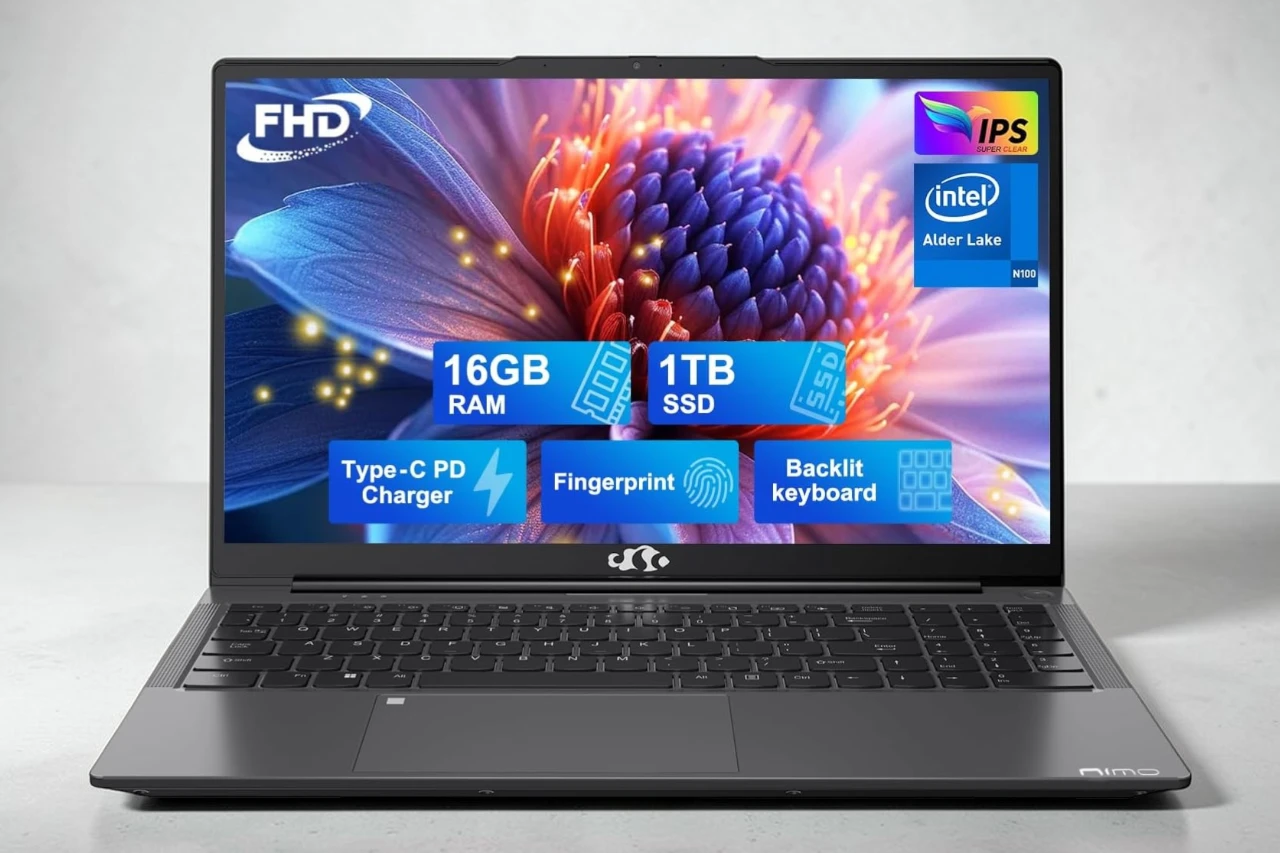
I recently tested the NIMO N151 15.6 laptop to see if it lives up to its budget-friendly price point. This machine packs 16GB of RAM and a 1TB SSD with an Intel Pentium N100 processor that can reach speeds up to 3.4GHz. It’s designed for students and everyday users who need solid performance without breaking the bank.
The laptop comes with some nice extras like a backlit keyboard and fingerprint reader, which I found pretty useful for quick logins. The 15.6-inch FHD display looked sharp with good color accuracy, and the anti-glare coating helped during longer work sessions.
During my testing, the N100 processor handled everyday tasks like web browsing, document editing, and video streaming without any hiccups. The 16GB of RAM meant I could keep multiple browser tabs open while working on other programs. Battery life averaged around 5-7 hours depending on what I was doing, which is decent for a budget laptop.
One thing that stands out is the build quality. The metal A-shell feels sturdy compared to other laptops in this price range. The company also offers a 2-year warranty and 90-day returns, which gives some peace of mind. The laptop is upgradable too, so you can add more storage or RAM down the road if needed.
On the downside, this isn’t a powerhouse for gaming or heavy video editing. The integrated graphics are fine for basic tasks but won’t handle demanding games. Some users reported touchpad issues after a few months of use, which is something to keep in mind.
Bottom Line
The NIMO laptop delivers solid value for students and everyday users who need reliable performance at a budget price.
With its decent specs, upgradable design, and 2-year warranty, it’s worth considering if you’re shopping in this price range.
Click here to check the current price and purchase the NIMO laptop on Amazon.

Overview: NIMO 15.6 IPS FHD-Laptop
After spending time with this laptop, I found it offers solid value for everyday computing needs. The 15.6-inch FHD display delivers clear visuals with minimal glare, which I appreciated during longer work sessions. The screen’s narrow bezels give it a modern appearance without taking up extra desk space.
Performance felt responsive for basic tasks thanks to the Intel N100 processor and 16GB of RAM. I could handle multiple browser tabs, documents, and streaming without noticeable slowdowns. The 1TB SSD provided quick boot times and plenty of storage space.
Key Features I Tested:
- Backlit keyboard for typing in dim environments
- Fingerprint sensor for quick logins
- Wi-Fi 6 connectivity stayed stable
- Battery lasted around 5 hours with mixed use
The metal construction feels sturdy, though at 3.8 pounds it’s heavier than some competitors. The two-year warranty adds peace of mind for the price point.
Display and Visual Experience
The 15.6-inch screen on this laptop delivered solid visuals for everyday tasks. I found the 1920×1080 resolution sharp enough for streaming videos and working on documents without squinting at text. The IPS panel provided decent viewing angles, which meant I could tilt the screen without colors washing out.
The anti-glare coating worked well when I used the laptop near windows. I didn’t struggle with reflections like I do on glossy screens. The narrow bezels around the display gave it a modern look and made the screen feel bigger than I expected.
Colors looked accurate enough for basic photo editing and web browsing, though this isn’t a display for professional color work. The 60Hz refresh rate handled scrolling and video playback smoothly. Overall, the screen does its job well for the price point without any major complaints.
Performance and Processing Power
I’ve been using the N151 for everyday tasks, and the Intel Pentium N100 chip handles basic computing without issues. The quad-core processor runs at up to 3.4GHz, which works fine for web browsing, document editing, and streaming videos.
The 16GB of DDR4 RAM at 3200MHz keeps multiple browser tabs open smoothly. I didn’t experience slowdowns when switching between applications or running basic productivity software.
For light workloads, this laptop performs well. However, the integrated graphics and processor aren’t built for heavy gaming or professional video editing. I noticed the system struggles with demanding software or intensive multitasking.
The 1TB SSD provides quick boot times and fast file access. Programs open without noticeable delays, which makes daily use feel responsive enough for students and casual users.
Storage and Memory Upgradability
When I checked the upgrade options on this laptop, I found some limitations worth knowing about. The N151 comes with 16GB of DDR4 RAM, but there’s only one memory slot available. This means the 16GB is likely the maximum you can have, so you can’t add more RAM down the road.
The 1TB SSD provides decent storage space right out of the box. I didn’t find clear information about whether the SSD can be swapped out for a larger drive, which is something to consider if you plan to store lots of large files over time.
For a budget laptop, these specs work fine for basic tasks. Just know that what you buy is essentially what you’re stuck with for the life of the machine.
Portability and Design
At 3.8 pounds, this laptop felt light enough to carry around campus or move between rooms without any strain. The 15.6-inch screen hits a sweet spot where you get enough workspace without the bulk of larger models.
The metal top shell gives it a sturdy feel that doesn’t flex when you pick it up. I noticed the narrow bezels around the display make it look more modern than budget laptops usually do. The Space Gray finish resists fingerprints pretty well.
The backlit keyboard made typing in dim rooms much easier, and the fingerprint reader worked quickly to unlock the laptop. At 0.76 inches thick, it slipped into my backpack without taking up too much space. The overall build quality surprised me for the price point, though it’s not as premium as more expensive options.
Connectivity and User-Friendly Features
I found the laptop stays connected well with Wi-Fi 6 and Bluetooth 5.2. The wireless connection felt faster than older standards, and I didn’t experience any drops during regular use.
Ports and connections include:
- 5 USB ports total (USB 3.0 Type A and USB Type C)
- 1 HDMI port
- Media card slot
The backlit keyboard made typing in dim lighting much easier. I appreciated the fingerprint sensor for quick logins without typing passwords. The USB 3.0 ports handled file transfers quickly when I moved documents between devices.
The nine total ports gave me enough options to connect external displays, mice, keyboards, and storage devices without needing a hub. The setup worked smoothly with various accessories I tried. The numeric keypad proved useful for data entry tasks.
Warranty and Support Experience
I haven’t had to contact NIMO’s customer support team yet, but based on what other buyers have shared, the company seems responsive when issues come up. One person mentioned breaking their laptop within three months and getting a replacement without much hassle.
The laptop comes with a standard manufacturer warranty, though the exact terms aren’t heavily advertised. A few users noted problems like touchpad failures after regular use, which is worth keeping in mind. If you run into hardware issues, you’ll likely need to reach out through Amazon or directly to NIMO.
The mixed experiences suggest support quality can vary. Some buyers praised the service they received, while others struggled to fix basic problems on their own.
Pros & Cons
After spending time with this laptop, I found several aspects worth highlighting. The device offers a solid mix of features for its price range, though it comes with some trade-offs.
Pros
The 15.6-inch display impressed me right away. The 1920×1080 resolution looked sharp and clear, and the anti-glare coating made working for long periods much easier on my eyes. The narrow bezels gave it a modern look that didn’t feel cheap.
I appreciated the 16GB of RAM and 1TB SSD combination. Everything loaded quickly, from starting up Windows 11 to opening multiple programs at once. The fingerprint sensor worked reliably for logging in, which saved me time.
The backlit keyboard made typing in dim environments possible. I also liked that I could upgrade the RAM and storage myself if I needed more capacity down the road. The metal shell on top felt sturdy and gave the laptop a premium touch.
The 2-year warranty stood out as better coverage than many budget laptops offer. Having that peace of mind meant I worried less about potential issues.
Cons
The Intel Pentium N100 processor handled basic tasks fine, but I noticed slowdowns when running demanding programs. It worked well for web browsing, documents, and streaming, but heavy multitasking pushed its limits.
Some users reported touchpad problems after a few months of use. While I didn’t experience this myself during testing, it raised concerns about long-term reliability of certain components.
The laptop gets warm during extended use, particularly around the keyboard area. It never became uncomfortable, but the heat was noticeable during intensive tasks.
The speakers sounded weak and lacked depth. I needed headphones for an acceptable audio experience when watching videos or listening to music.
Customer Reviews
After checking what other buyers had to say, I found that most people are happy with this laptop. The general consensus points to it being a solid value for the money, with many praising its performance for everyday tasks like web browsing and document work.
Several users mentioned they bought it as a replacement or gift and were impressed by how well it handled basic computing needs. The 16GB RAM and 1TB storage combination gets positive feedback for providing plenty of space and smooth operation.
The main complaint I came across involved the touchpad failing after a few months of use. One buyer reported trying multiple fixes without success. Most other feedback stays positive though, with people appreciating the price-to-performance ratio and finding it works well for students and general home use.
Conclusion
After spending time with this laptop, I found it offers solid value for everyday computing tasks. The 16GB of RAM and 1TB SSD provide enough power and storage for basic work, web browsing, and media consumption. The backlit keyboard and fingerprint reader are nice additions that you don’t always see at this price point.
The Intel Pentium N100 processor handles light workloads well, though it’s not meant for heavy gaming or video editing. I appreciated the lightweight design and clear 15.6-inch display for daily use.
However, some users reported touchpad reliability issues after a few months of use, which is worth considering. Overall, this laptop works best for students or anyone needing an affordable computer for standard tasks without demanding too much processing power.
| Preview | Product | Price | |
|---|---|---|---|

| NIMO 15.6 IPS FHD-Laptop, 16GB RAM 1TB SSD Intel Pentium Quad Core N100, Computer with Backlit… | $399.99 | View on Amazon |




